Every month-end close has its quirks. Across the organizations we work with, the time usually disappears in the same three places:
The first fix is rarely a new tool or a long project. Workday Financials already includes delivered reports and tasks that surface these issues early – and where those stop short, a few custom reports easily fill the gaps.
If you aren’t already checking these three areas before you close the books each month, try these out and see if they speed up your close.
Don’t Let Prepaids Slip Through the Cracks
Prepaids depend on one easy-to-miss step: checking the “prepaid” box on the supplier invoice. Skip it, and the spend gets miscategorized as an expense instead. A Potentially Missed Prepaids custom report — pre-filtered for spend categories and dollar thresholds where prepaids commonly hide, like insurance or annual software subscriptions — flags these before they distort an expense trend.

Once a prepaid is captured correctly, it still needs an amortization schedule generated and submitted. The Prepaid Amortization Validation custom report makes it easy to check two things every month: that a schedule exists at all (a prepaid with no schedule sits on the balance sheet forever and never amortizes), and that the installment count looks right — a 13-period schedule where 12 was expected usually means a date was entered wrong when the schedule was built.

The standard Prepaid Amortization Details report shows every schedule and its unamortized balance. That total should tie directly to the prepaid balance on the trial balance. When it doesn’t, a Prepaid Rollforward custom report — beginning balance, additions, amortization, ending balance, compared against future approved schedules — makes it obvious exactly which addition is missing its schedule, instead of researching supplier by supplier.
Demo: Prepaid reporting in action
Reconcile Fixed Assets Every Month — Not Just at Audit Time
Asset to Ledger Reconciliation is a Workday-delivered report that ties the business asset general ledger to the sub-ledger, broken out by spend category. Run it before depreciation each month. If a spend category was missed during conversion — which happens often — this is where the mismatch between the general ledger and the asset register shows up. Another common reason for a mismatch is fixed asset accounting via manual journal. If a manual journal entry is made that impacts fixed assets without updating the subledger accordingly, the ledgers will be out of sync with each other.
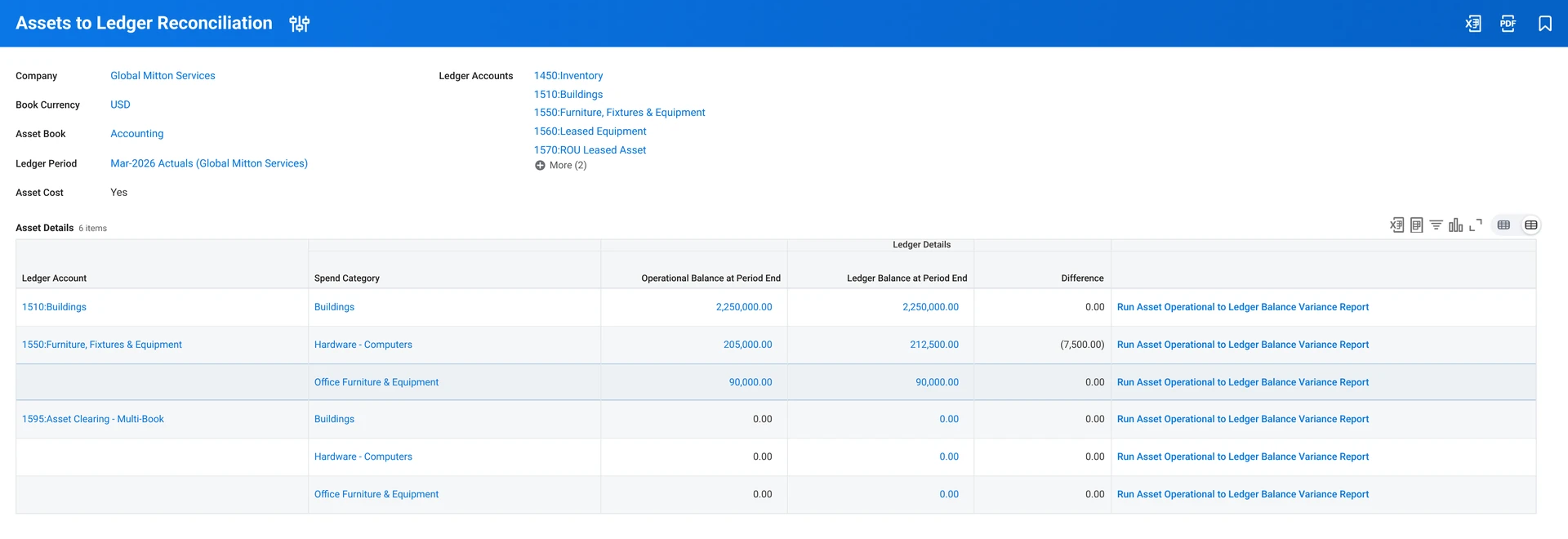
Beyond the standard report, a custom Potentially Missed Fixed Assets report can save real time. Pre-filter the general ledger for postings to expense accounts over a chosen dollar threshold, in spend categories that are typically capitalizable. Instead of scrolling through hundreds of journal lines looking for something that should have been capitalized, the result is a short, pre-filtered list to review — with a documented answer, ready for auditors, on why each item stayed in expense or got reclassified.

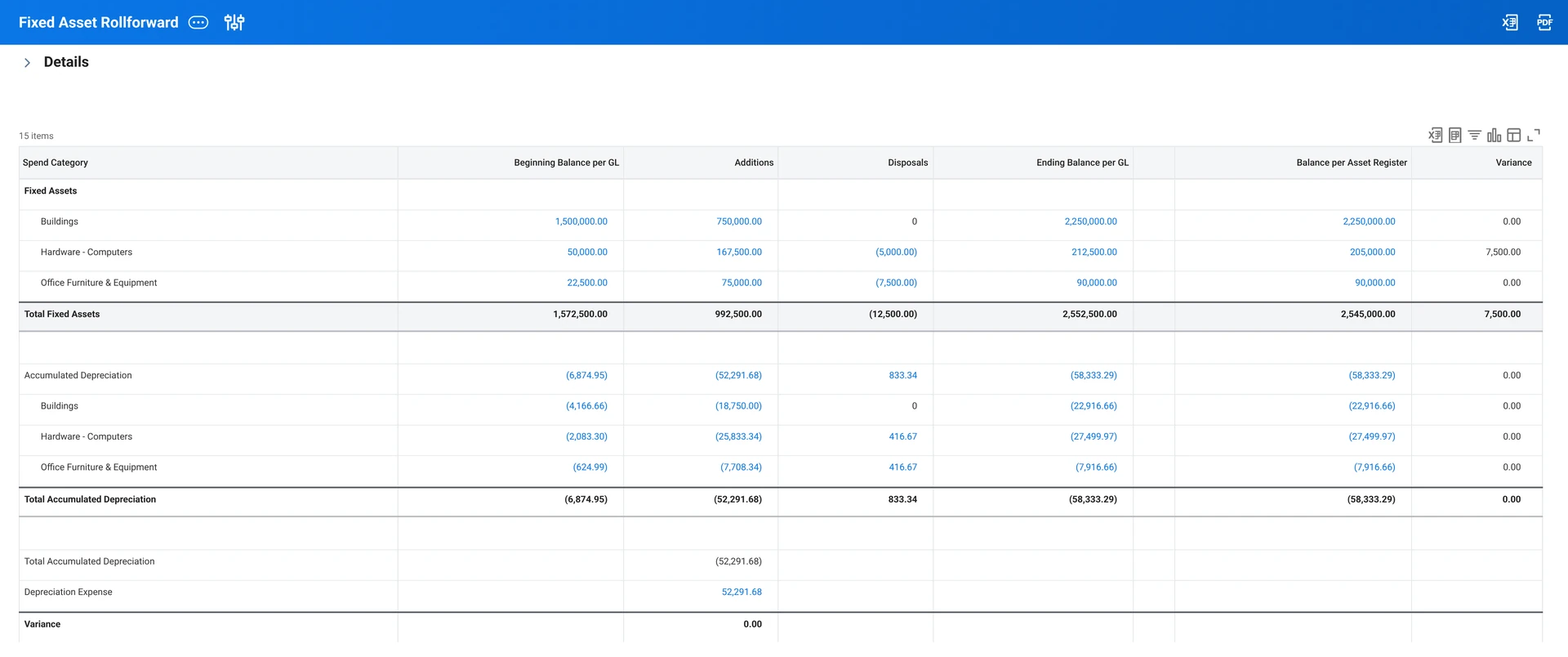
A Fixed Asset Roll Forward custom report — beginning balance, additions, disposals, ending balance, tied to the sub-ledger — turns what’s usually a manual, multi-hour exercise into something built directly into the tenant. It also confirms that depreciation expense and accumulated depreciation additions match for the period, which is exactly what auditors like to see.
Demo: Fixed Asset reporting in action
Get Intercompany Eliminations to Actually Tie
For a multi-entity organization, if eliminations aren’t tying, the intercompany affiliate worktag is almost always the reason. Workday needs both sides of an intercompany transaction tagged — the parent’s receivable and the subsidiary’s payable — to eliminate them against each other. Miss the tag on either side, and the balance sits there, unreconciled, generating audit questions later.
The Intercompany Elimination Out of Balance report shows the relationship between all companies to ensure they agree — it consolidates every relationship across the hierarchy and highlights exactly which ones are off. Run it monthly, for every elimination rule, before calling the books closed.
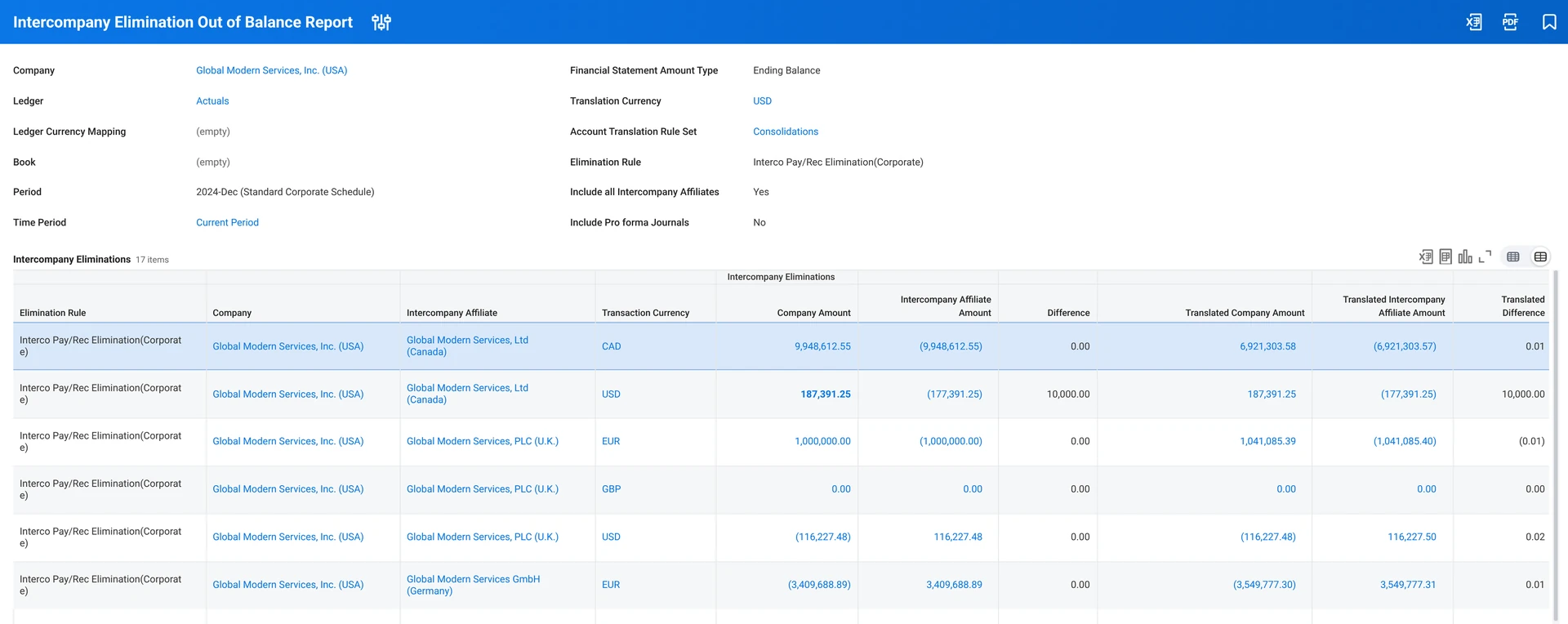
When something’s off, open both sides of the report side by side and pivot by journal source. More often than not, the cause is a beginning balance or a manual journal entry that was tagged on one side and not the other — and beginning balances from a system conversion are worth checking first, since that’s where the tag tends to get dropped.
However, this won’t catch if the tag was missed on both sides. Running the standard Trial Balance report displaying the Intercompany Affiliate can highlight these blanks.
Demo: Intercompany Reporting in action
The Result
Every company’s close bottlenecks are specific to that organization — but the pattern for solving them tends to hold. A couple of examples from Workday Financials customers we’ve worked with:
Zero Variance
A multi-entity organization managing close to 90 individual locations went from a chronic, unexplained intercompany imbalance to a fully reconciled elimination report with about two months of focused work. Commit helped the team break a dauntingly complex challenge into smaller, more addressable problems. They were able to identify that most of their imbalances stemmed from missing worktags, then work through other imbalances manually until they had all been resolved. Now the Out-of-Balance report is all zeros and they run it monthly to make sure imbalances don’t re-occur.
Faster, Month Over Month
One organization had a period close checklist that hadn’t changed in decades. Workday doesn’t change the order of operations, it centralizes the checklist and creates transparency. Previously invisible inefficiencies were quickly identified and tasks redistributed to better balance the workload across the team. Hours saved across many different tasks compounded to shave a full work week off each month’s close.
Neither of these organizations changed systems. They found what Workday could already do, closed the gaps with the right reporting, and made the process visible enough to keep improving.
None of this requires new functionality — just using what’s already in the tenant, and knowing where to look. If you want a starting point for your own validation process, download our Month-End Close Checklist: a generalized list of the things worth checking before calling a period closed, built to be adapted to your own chart of accounts and close calendar.
Most of what’s covered here is native Workday Financials functionality. Where native reporting doesn’t go far enough — like turning period close tasks into real-time visibility for a controller or CFO — we build the reporting and dashboards to close that gap directly in the tenant, including our custom Accounting & Close Dashboard.
Have questions about tightening up your own close? Commit is here to help.