Our Workday 2026 R1 Highlights

Workdayยฎ 2026 R1 is here!

The latest release from Workday is here โ€” and 2026 R1 is packed with value. Weโ€™ve cut through the noise to highlight the most impactful updates coming to your tenant into one streamlined, functional-area guide, so you can quickly see what matters most.

See more highlights from previous Workday releases here.

Have questions?ย Donโ€™t hesitate to reach out.ย The Commit team is available to answer your R1 questions.

Our Rating Scale

For updates that require configuration, hereโ€™s what to expect in terms of Level of Effort.

Low
<5 hours
Medium
5-10 hours
High
10+ hours

Automatically Available updates are not assigned a Level of Effort

Financials

Business Views for Financial Management & Spend Management

New Business Views enhancing reporting capabilities

Availability: Set Up Required

Level of Effort

Why this is important: This release introduces new Business View Data sources. Provides a consolidated and refined view of information for more efficient and clearer reporting.ย ย 

Business views blend and curate data from multiple Workday-delivered data sources
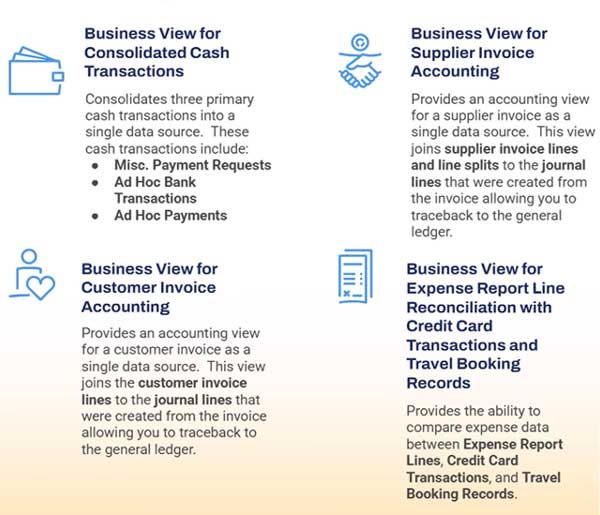
  • Reduce complexity and confusion, making report creation more streamlined and intuitiveย 
  • Create deeper insights by combining data from various Workday sources into a comprehensive view
fins business views 600 515 01
fins business views 600 515 02

AI Powered Auto Reconciliation

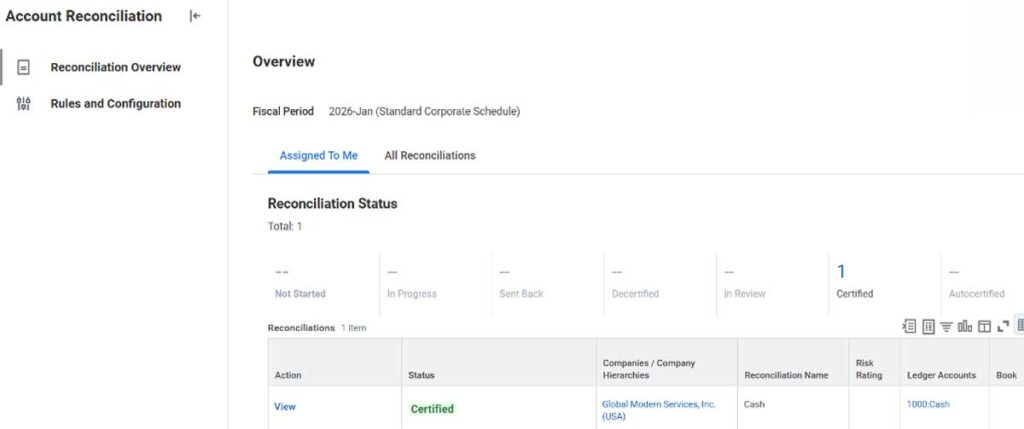
New Account Reconciliation Hub

Availability: Set Up Required

Level of Effort

Why this is important: ย A central access point for all information and actions needed to manage your reconciliations. This functionality enables you to quickly identify and resolve discrepancies in financial records during month-end close.ย ย 

Features & Benefits

  • The new hub acts as a single point of entry forย account reconciliationย tasks and reports.
  • Create Recon Items to confirm Certification for non-Workday transactions.
  • Partnership with Trintechย to match Journal Lines and Third Partyย Data to create Recon Items.
fins ai auto recon 1200px 1

Enhanced Usability for Purchase Order Line Linking

Enhances complex matching for OCR Invoices

Availability: Automatically Available

Why this is important: Ease of linking multi-line supplier invoices to the corresponding purchase orders. Reducing time spent in linking invoices and reducing errors by providing an intuitive user interface to link invoice lines

Overhauling user interface for swifter PO Line Linking

  • AP Processors can quickly perform PO overrides and link invoice lines regardless of quantity
  • Creating a tangible impact on invoice processing

Split Screen view of Supplier Invoice Lines & Purchase Order Lines

  • Additional Functionality includes search filter processing, highlighting options, and PO line Copying into Invoice Lines
fins enhanced PO linking 1200px

HCM

Job Changes

Feature Opt-Out Removed for Change Job Templates โ€“ New User Experience

Availability: Automatically Available

Why this is important: The ability to opt out of the Change Job Templates โ€“ New user Experience had been removed. If you have previously opted out, you will want to be aware of the new initiating actions available in job templates, and the ability to configure them to use the enhanced user interface.
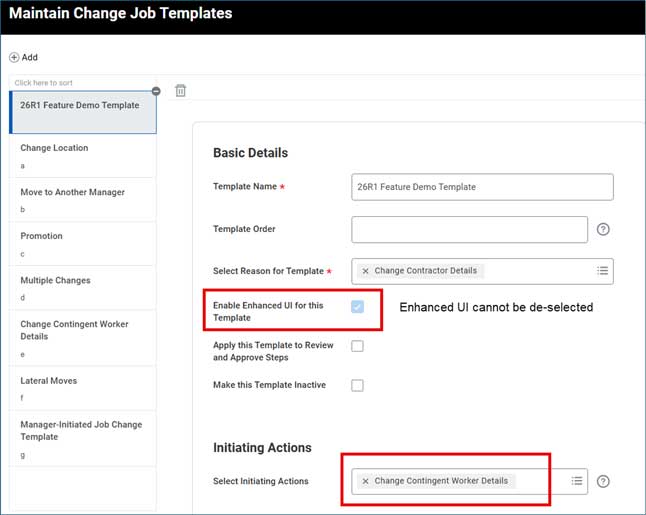
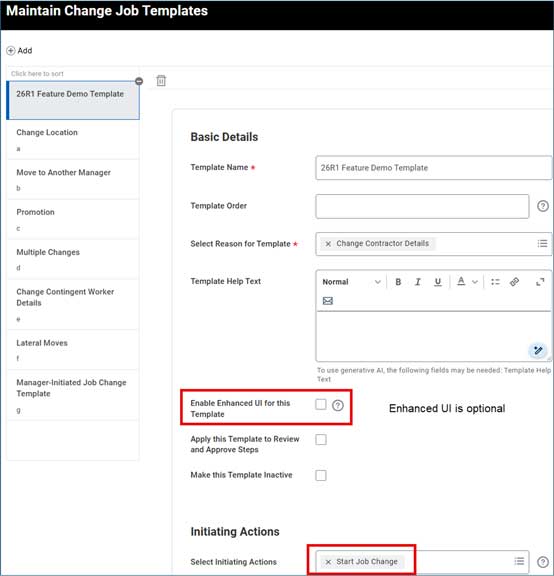
  • Administrators can no longer opt out of the Change Job Templates โ€“ New User Experience feature
  • If you have not opted out, you will see no changes
  • If you have previously opted out, youโ€™ll notice 4 new initiating actions on Maintain Change Job Templates. For these initiating actions, must use the enhanced UI โ€“ you cannot clear the Enable Enhanced UI for this Template check box
  • Change Contract Contingent Worker
  • Change Job
  • Change Location
  • Request Transfer
  • You can clear the check box for any existing templates you configured for the Start Job Change initiating action
  • Note: This update will not force the new UI. That is scheduled for 2026R2
hcm job changes 01
hcm job changes 02

Change Job Enhancements

Correct Change Job Events in Mass Now Available

Availability: Automatically Available

Why this is important: This enhancement enables high-volume corrections to Change Job business process events through the new web service and expands the range of correctable fields.

Header

  • Workday delivers a new Correct Change Job EIB and includes more correctable fields for Change Job. With this feature, you can process Change Job corrections at scale.
  • Workday now provides you more fields to correct in the enhanced user interface:
  • Headcount Change
  • Supervisory Organization
  • Position
  • Note: If the Change Job business process event doesnโ€™t have the enhanced user interface enabled, you cannot correct them manually using the correct tool and you can only correct those fields using the Correct Change Job EIB
hcm change job mass

Job Profile Visibility

Restrict Job Profile Visibility by Country and Organization

Availability: Automatically Available

Why this is important: This feature improves data governance and user experience by ensuring managers can only select appropriate job profiles for their region or organization, reducing configuration errors, improving data consistency, and supporting global job profile differentiation across the business.

Key Feature Overview

  • Workday now allows job profiles to be restricted by country, company, and supervisory organization or a combination of all three.
  • During staffing transactions, users will only see job profiles that are valid based on the configured restrictions.
  • Restrictions can be applied at:
  • Country level
  • Supervisory Organization or Company level
  • Combined country and organization rules

How It Works

  • New Restrict to Organization field added to Job Profile configuration.
  • Existing Restrict to Country functionality is enhanced and enforced across staffing events.
  • Restrictions apply to major staffing processes such as:
  • Hire, Create Position, Job Change, Transfer, Compensation Review, and International Assignment
  • If a job profile is not valid for the selected country or organization, it will not appear for selection.

Adaptive

Adaptive Planning Hubs

Allows Users to Organize, Navigate, and Interact with a Collection of Elements

Availability: Set Up Required

Level of Effort

Why this is important: Hubs provide a single, unified workspace for planners, analysts, and managers, reducing time spent navigating different parts of the application and ensuring users only see relevant content.

New Hubs option in the menu for users to organize, navigate, and interact with a collection of dashboards, sheets, reports, links, and tasks
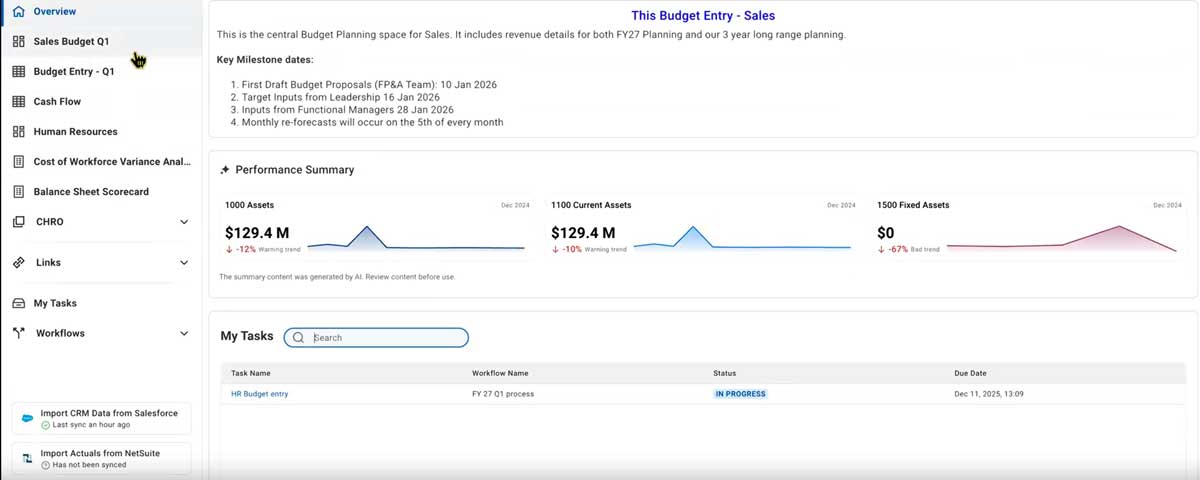
  • New Manage Hubs page in Administration for creating, editing, cloning, and sharing hubs.
  • Reduced time spent navigating across dashboards, reports, and sheets
  • Assign Access Hubs and Access Dashboards Permissions to users who should view hubs
adap planning hubs

Org Design and Scenario Modeling

New Workday Dashboard Allows for Various Structural Scenarios

Availability: Set Up Required

Level of Effort

Why this is important: This feature enables workforce planners and HR business partners to model organizational changes in a secure sandbox environment, creating multiple what-if scenarios to restructure hierarchies and see impact on headcount, FTE, and costs.

New Functionality

  • New Org Models and Scenarios dashboard in Workday allows for effortless assess, model, and the evaluation of various structural scenarios
  • Drag and drop organizations or positions to move them to different parts of the hierarchy.
  • Compare scenarios side-by-side to view differences in headcount, cost, and structure.

View key metrics like Total Workforce Cost, Headcount, FTE, Span of Control, and Layers that update dynamically

  • Enable the new Manage: Org Models, Participate: Org Models, and Set Up: Org Model domains.
  • An unlimited number of org scenarios and deliver impact assessment

Configurable Workflows

Enables Users to Design, Orchestrate, and Execute Planning Cycles

Availability: Set Up Required

Level of Effort

Why this is important: This feature enables you to design, orchestrate, and execute planning cycles with a new framework for reusable workflow definitions, dynamic task assignments, and lifecycle management within Hubs.

New Functionality

  • Drag and drop to move submit and approve task groups, submit and approve task groups, move to-do tasks, and reorder tasks
  • Users can configure task definitions to direct users

New Workflows Page Available within the Hubs Section

  • View and access your assigned to-doโ€™s, submit, and approved tasks
  • A new Enable Configurable Workflows check box is available on the General Setup page in Administration.
  • A new Manage Workflows permission that is required to create definitions and monitor workflows.

Absence

View and Report on Schedules in Absence

Schedule visibility is now available in Absence

Availability: Set Up Required

Level of Effort

Why this is important: This release brings schedule visibility to Absence! You can now view schedules, report on calendar configurations and assignments, and give workers access to their schedule detailsโ€”without needing Workday Scheduling or Time Tracking.

Business Benefits

  • Streamlines reporting with admin access to work schedules
  • Reduces manual effort and supports better workforce planning
  • Improves employee experience with self-service schedule visibility
  • May decrease HR/support requests

Whatโ€™s New?

  • New Time Off & Leave security domains enable:
  • Worker self-service schedule viewing
  • Manager/admin access to worker schedules
  • Reporting on work schedule calendars and assignments
  • Tasks and reports (My Schedule, Schedule History, Calendar audits) are now secured under these new domains
  • Self-Service: Work Schedule to Self-Service: Work Schedule: Time Tracking
  • Worker Data: Work Schedule to Worker Data: Work Schedule: Time Tracking

Benefits

Coverage Waive Date for Enrollment Event Rules

Track Waive Dates Differently Than Begin Dates

Availability: Set Up Required

Level of Effort

Why this is important: This update increases accuracy by adding expanded configuration options around waived benefit coverage. This update also supports regulatory compliance for US federal users.

New Coverage Waive Date Column Added to Start/Waive Coverage Tab on Enrollment Event Rule
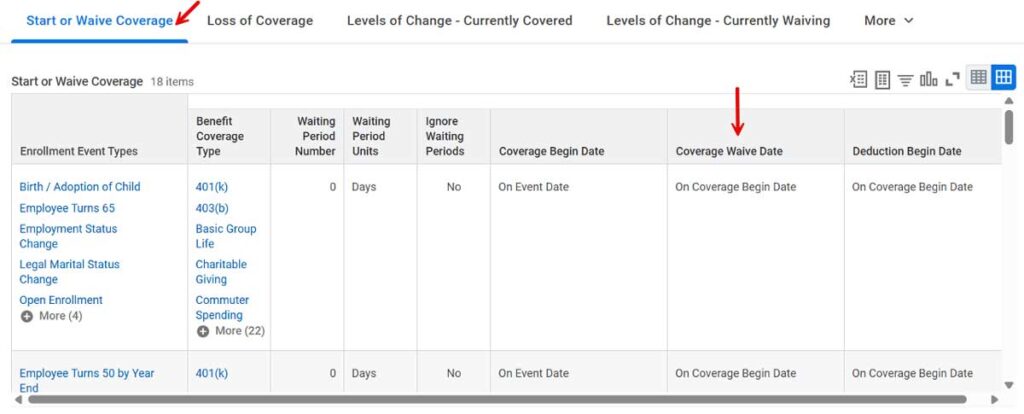
  • Applied if a coverage type is completely waived during a life event change
ben coverage waive dates 1200px

Available Options:

  • On Coverage Begin Date (Default)
  • First of Month Following Event Date
  • First of Month On or After Event Date
  • On Pay Period Begin After the Later of Event or Submission Date

New Rule is ignored if:

  • Plan is elected for the first time
  • Re-elects a plan in a previously waived coverage type
  • Changed plans within a coverage type
  • Changed coverage tiers in an elected health care plan
  • Coverage in elected insurance plan is reduced or increased

Updateย Marital Status in Benefit Enrollment Questionnaire

Consolidate Personal Info Change & Benefits Workflow

Availability: Set Up Required

Level of Effort

Why this is important: This update consolidates the marital status personal information update withing the benefits workflow. Capturing marital status changes at the point of enrollment allows for more accurate eligibility and reporting.

New Fields within Benefit Enrollment Questionnaire:

  • Marital Status
  • Marital Status Event Date

Propose new marital status & effective date during QLE or Open Enrollment:
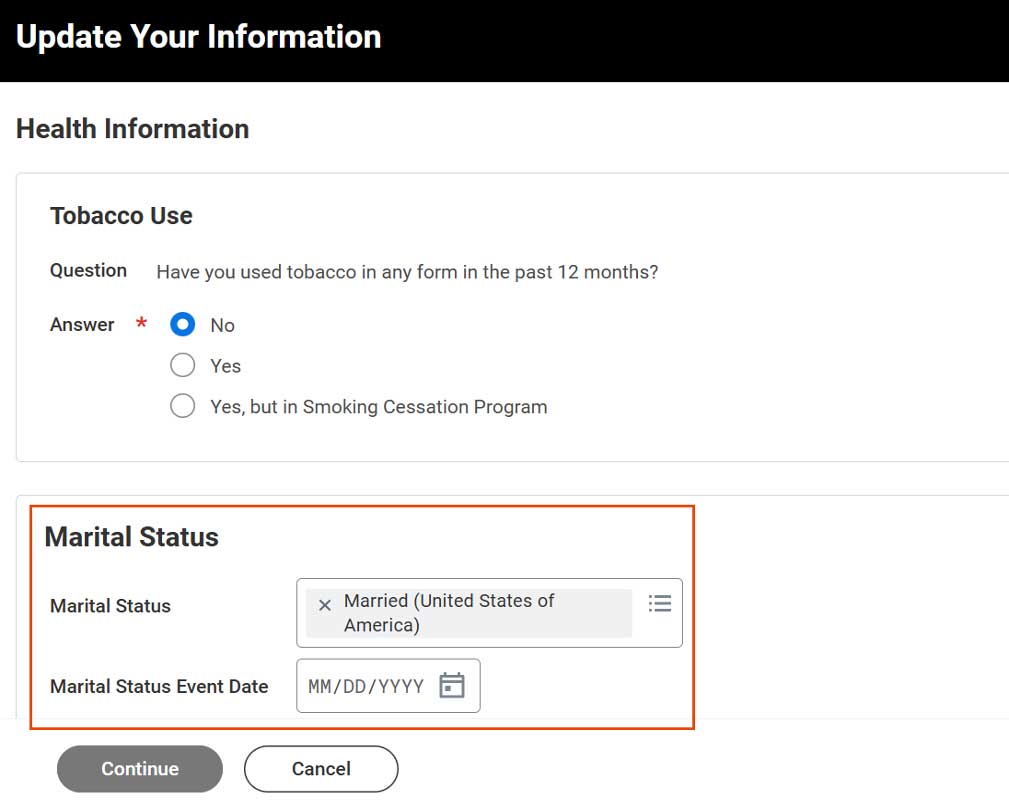
  • After event with a marital status update is finalized, a Personal Information Change event is automatically initiated and completed
  • If existing Personal Information Change is in progress, new fields are read-only
ben marital status enrollment

Dependent Effective Dating

Expanded Effective Dating Logic for Dependent Data

Availability: Automatically Available

Why this is important: Having effective dated dependent data allows for more accuracy with eligibility, compliance, and reporting requirements.

Effective Date is added as an initiating element when adding/updating dependent

  • Assigns effective date to more dependent data points/report fields
  • Add dependents as of any date including in the future (DOB must be in the past)
  • New Actions button to view, edit, delete as of a specific date

New Future Dependents grid on worker profile:
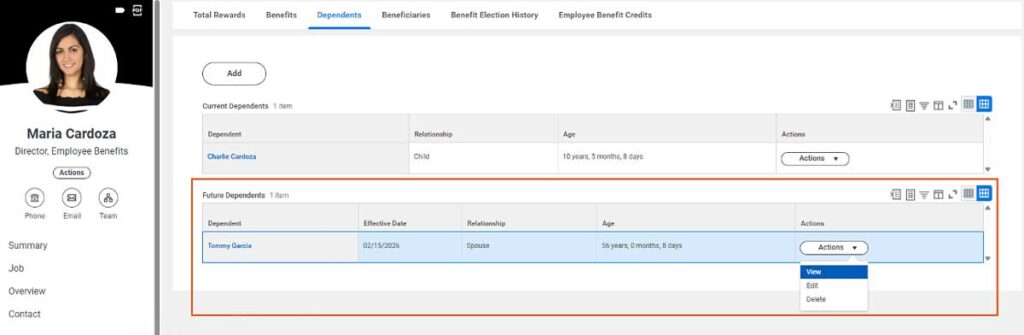
ben dependent effective dating 1200px 1

Users can correct the effective date of when a dependent was added/edited if the date initially selected was incorrect

  • Eliminates need to cancel and re-initiate the entire event just to change the date
  • Benefit Admins/Partners can use Approval or Verify Dependent Eligibility step to send the event back to the worker and worker can Revise Dependent Event

Compensation

Calculated Award Pools

Apply a custom calculation to non-funded award pools

Availability: Set Up Required

Level of Effort

Why this is important: This will help to automate and more precisely control non-funded award pool calculations, reducing manual effort while ensuring more accurate and consistent planning.

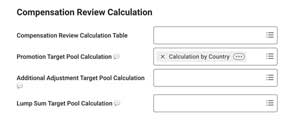
Automatically calculate non-funded award pools using a custom calculation

  • Set up a custom calculation (or use existing calculation)
  • Attach the calculation to the Compensation Review Options
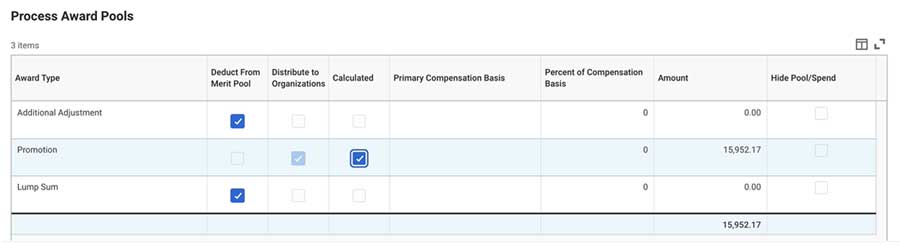
  • When you launch a compensation review, Workday will calculate the promotion budget based on the calculation
  • When calculated, it will show on the Configure Pools page of the Initiate Compensation Review Process Business process stepย 

Important Notes

  • When calculating the non-funded award budget, you are not able to deduct it from the Merit Pool
  • Workday annualizes the pool amount for employees, so you may need a separate calculation for hourly and salaried employees
comp calc award pools 01
comp calc award pools 02

Multiple Promotion Reasons for Compensation Review

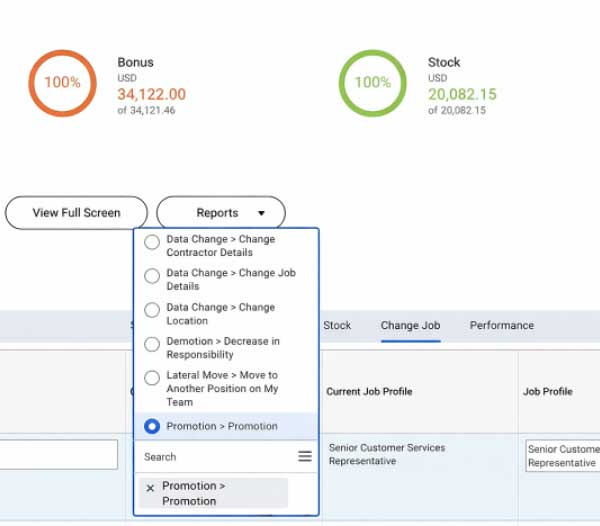
You can now select from multiple Job Change Categories when giving a promotion

Availability: Set Up Required

Level of Effort

Why this is important: This update will improve flexibility in compensation reviews, allow more granular control over promotion reasons, and will help support organizations with multiple promotions types.ย 

Compensation Review Options

  • In the Compensation Review Options, you can select which Job Change categories will be available in Promotion grid

Compensation Review Process

  • When planning a promotion, managers can now select a promotion reason from the list of reason categories defined for the processย 
  • Promotion Reason field must be editable in the configurable grid
comp mult promo reasons 01
comp mult promo reasons 02

Enhanced Performance for High-Volume Stock Plans

New Grant Split option to enhance performance

Availability: Automatically Available

Why this is important: This will make it much easier to manage stock plans with over 1,000 profiles without running intoย  debilitating performance issues

Stock Grant Profiles

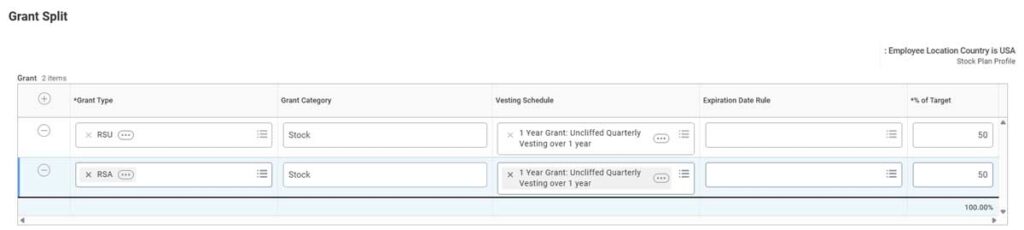
  • Workday removes the embedded Grant Split grid from the profile view
  • Replaces this with a new โ€œGrant Splitโ€ button, which opens up a Grant Split window where you can edit the Grant Type, Grant Category, Vesting Schedule, Expiration Date Rule, and % of Target
comp enhanced perf HVSP 01 1200px
comp enhanced perf HVSP 02 1200px

Payroll โ€“ Core

Global Payroll Hub and Payroll Processing Checklist

ย Central place to view insights for both Workday and external payrolls, and to create and manage payroll processing checklists

Availability: Set Up Required

Level of Effort

Why this is important: Provides real-time payroll insights and checklist visibility in one place, streamlining processes and strengthening auditability

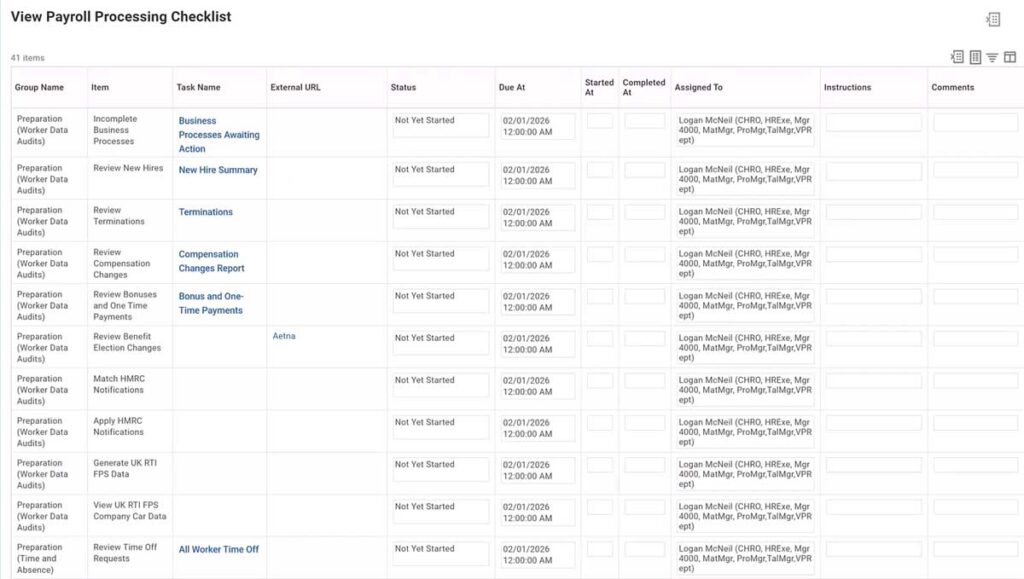
The Global Payroll Hub now supports Workday-processed pay groups, allowing you to create, view, and manage payroll checklists
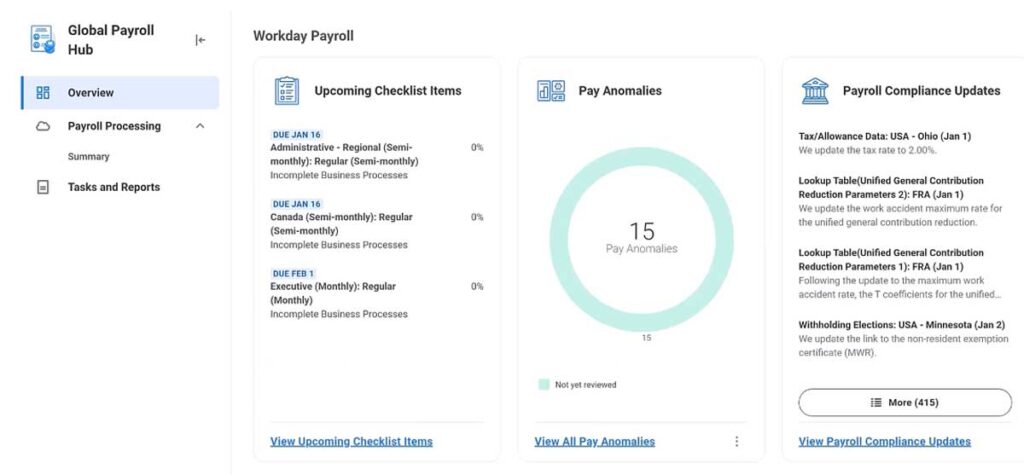
  • Create template: Maintain Global Payroll Processing Checklist Templates task
  • Summary page: Create/View checklist; Details page: Manage checklist
pay core global payroll hub 1200px

Other Additions

  • Overview page: Highlights checklist, pay anomalies, and compliance updates
  • Tasks and Reports page: Commonly used payroll tasks and reports
pay core proc checklist 1200px

Pay Accounting Reallocation

Enables updates to accounting on completed payroll results

Availability: Set Up Required

Level of Effort

Why this is important: Ease of processing multiple payroll accounting adjustments on completed results

Identify necessary updates, backdate allocations accordingly, and Run Pay Accounting Reallocation task to view potential new accounting entries

  • View accounting entries via the pay result on the Other Accounting tab
pay core acct reallocation 01 1200px 1

Complete Pay Accounting Reallocation task to post entries
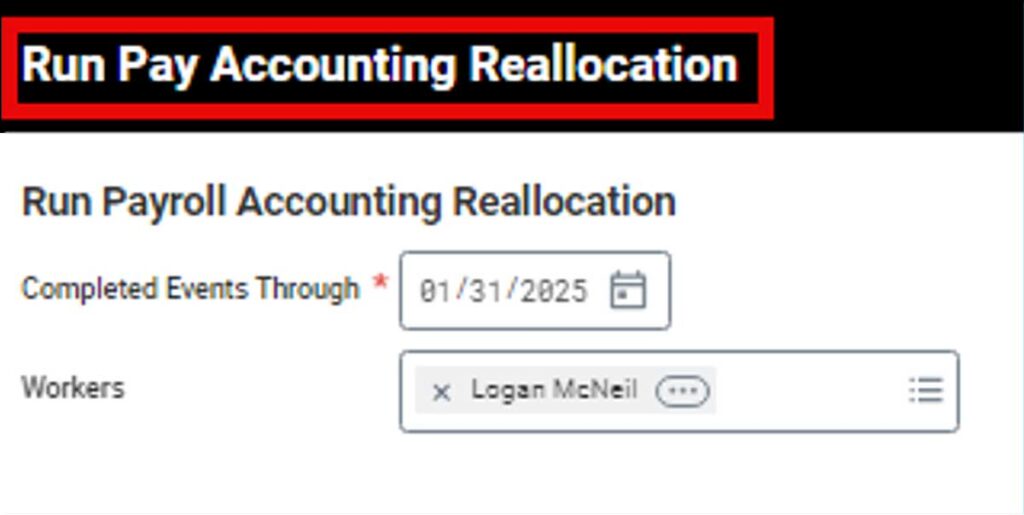
  • This task can not be reversed or rescinded
  • However, you may cancel all in progress and in error pay account reallocations for workers before completion is run
pay core acct reallocation 02 1200

Dynamic Earnings / Deductions for Workers

Available pay components based on Country and Pay Group

Availability: Automatically Available

Why this is important: This update saves time and avoids errors when entering payroll input

The list of available earnings and deductions for worker payroll input is based on the workerโ€™s pay group, with country-specific pay components

  • You will only see pay components relevant to the worker

The nested submenus were removed from the following tasks:
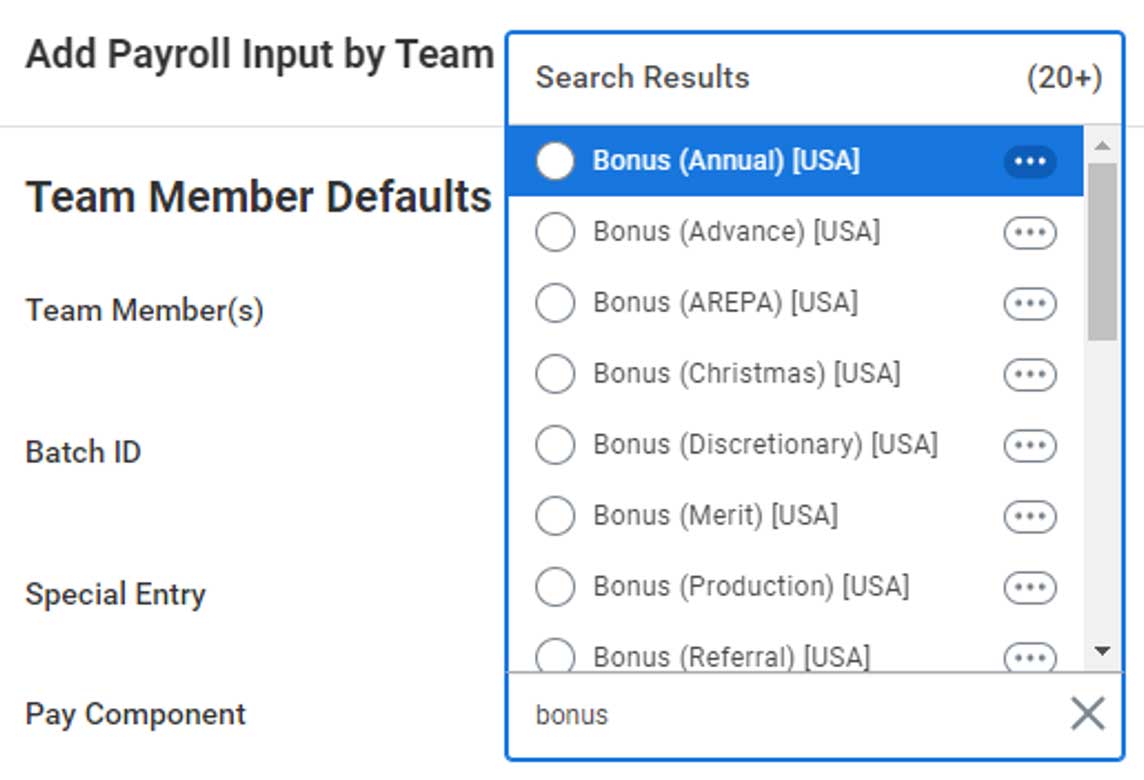
  • Add Payroll Input by Worker
  • Run Manual Payment for Worker
  • Run History Payment for Worker
  • Run On Demand Payment for Worker
pay core dynamics earnings deductions

Payroll โ€“ U.S.

Payroll AI Agent

An AI-powered conversational assistant designed to improve the payroll practitioner experience within Workday.

Availability: Set Up Required

Level of Effort

Why this is important: Improves efficiency for payroll operations by enabling processors to find relevant data more easily and by decreasing the amount of human resource constraint.

Payroll Agent retrieves basic payroll information, such as worker details, pay groups, and company information โ€“ the agent will be found on the Workday home screen

  • Payroll Data Insights: performs actions on behalf of users with occasional human intervention.
  • Missing + Outdated Audit: monitors system for missing or outdated payrollย  data, minimum wage rates, etc.

Requires security and skills configuration before becoming available for use.

pay can payroll agent

Withholding Orders for ESS

Allows workers to view information about their active and historical withholding orders

Availability: Set Up Required

Level of Effort

Why this is important: Reduces time that payroll administrators spend fielding requests for information on withholding orders.

View-Only Access for Employee as Self

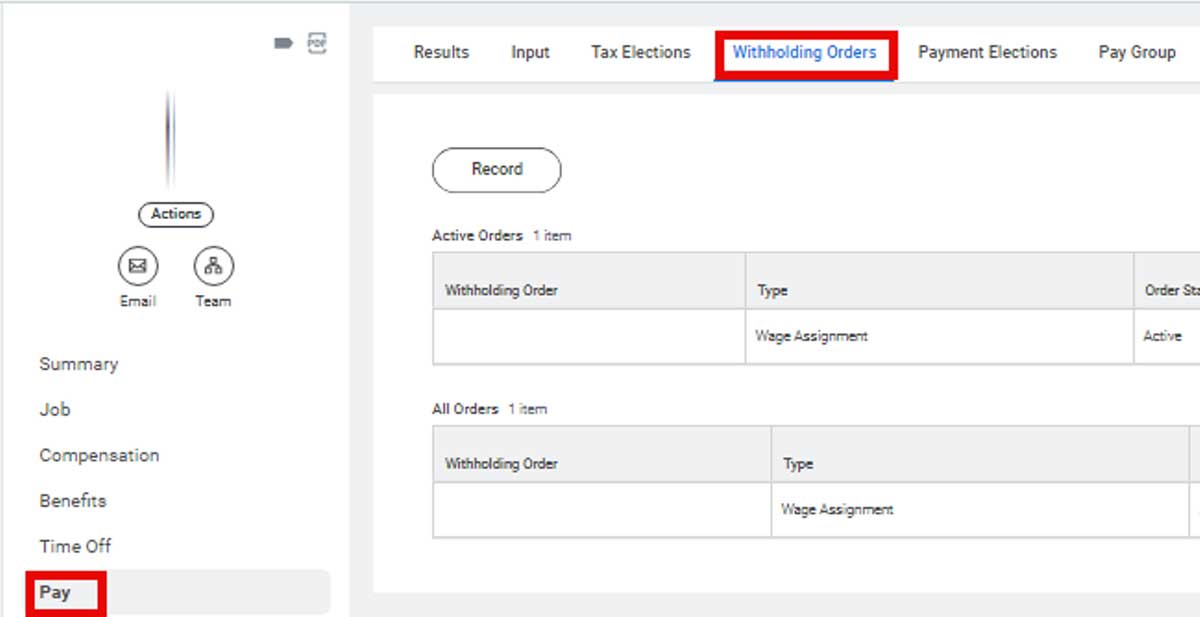
  • Enable Employee Self Service (View Only) check box in the Withholding/Court Orders section of the Edit Tenant Setup โ€“ Payroll task
  • Workers can access active and historical orders via the Withholding Orders profile tab
  • Workers withoutย any orders will see a blank tab

Allows worker to run Withholding Orders Report for self

  • Secure workers to the Self Service: Payroll (My Withholding Elections) โ€“ USA/CAN domain

Total Debt Amount column is now included on the Withholding Orders report
pay us withholding orders ess

State Exceptions for Local Taxes

A single state-level exception is automatically applied to relevant local resident taxes

Availability: Automatically Available

Why this is important: Simplifies setup and maintenance of state-level tax exceptions

State-level tax exceptions created/edited on the Maintain Tax Authority Exceptions Pay Component Groups task automatically apply to:

  • Local Withholding Taxable (Withhold Taxes) [USA]
  • Local Withholding Taxable (Do Not Withholding Taxes) [USA]
  • Local Withholdingย Taxable Reduction [USA]
  • Local Withholding Taxable Employer (Withhold Taxes) [USA]
  • Local Withholding Taxable Employer (Do Not Withhold Taxes) [USA]

Review ALL existing state-level exceptions โ€“ these automatically apply to all local resident taxes within state

  • Unintended changes in tax calculations could occur if not reviewed preemptively
pay us state local tax exceptions 1103px

Payroll โ€“ Canada

Payroll AI Agent

An AI-powered conversational assistant designed to improve the payroll practitioner experience within Workday.

Availability: Set Up Required

Level of Effort

Why this is important: Improves efficiency for payroll operations by enabling processors to find relevant data more easily and by decreasing the amount of human resource constraint.

Payroll Agent retrieves basic payroll information, such as worker details, pay groups, and company information โ€“ the agent will be found on the Workday home screen

  • Payroll Data Insights: performs actions on behalf of users with occasional human intervention.
  • Missing + Outdated Audit: monitors system for missing or outdated payrollย  data, minimum wage rates, etc.

Requires security and skills configuration before becoming available for use.

pay can payroll agent

Withholding Orders for ESS

Allows workers to view information about their active and historical withholding orders

Availability: Set Up Required

Level of Effort

Why this is important: Reduces time that payroll administrators spend fielding requests for information on withholding orders.

View-Only Access for Employee as Self

  • Enable Employee Self Service (View Only) check box in the Withholding/Court Orders section of the Edit Tenant Setup โ€“ Payroll task
  • Workers can access active and historical orders via the Withholding Orders profile tab
  • Workers withoutย any orders will see a blank tab

Allows worker to run Withholding Orders Report for self

  • Secure workers to the Self Service: Payroll (My Withholding Elections) โ€“ USA/CAN domain

Total Debt Amount column is now included on the Withholding Orders report

pay us withholding orders ess

Cross Application & Security

Workday Self-Service Agent

Conversational AI tool for self-service

Availability: Set Up Required

Level of Effort

Why this is important: Beginning in early 2026, Workday will begin offering a new AI chatbot to help grow user self-service. This agent ultimately replaces Workday Assistant.

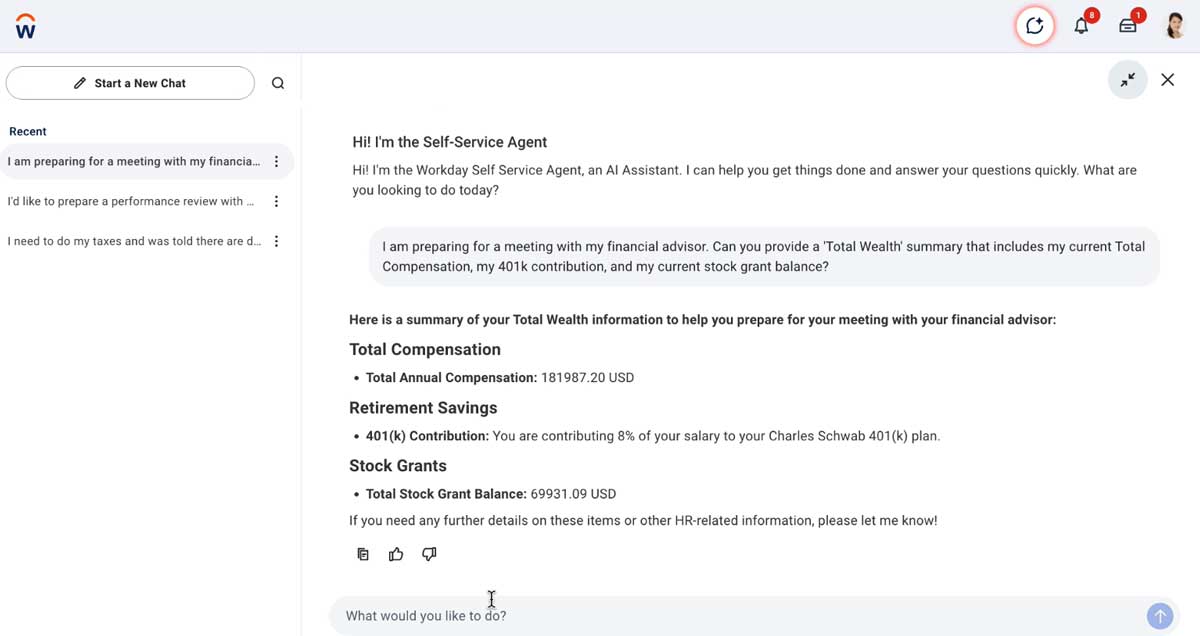
Self-Service Agent is a conversational AI tool that is built to retrieve and summarize information from multiple sources in Workday

  • Designed to help drive self-service tasks for both workers and managers
  • Provides functionality in multiple functional areas including HCM, Payroll, Talent Management, Help, and more

Self-Service Agent will eventually replace the legacy Workday Assistant chatbot

  • Workday assistant is scheduled to be retired in 2027 R2
  • This gives clients roughly 18 months to test WSSA and prepare for the transition

Configurable via the new Agent Management Hub
  • WSSA requires opt-in to the Universal Main Service Agreement (USMA)
cross workday self service agent

Global Navigation Standardization

User Interface Enhancement

Availability: Automatically Available

Why this is important: The Global Navigation sidebar will now be turned on by default. Additional changes includeย  the use of the General Branding Color for the sidebar and required menu cagtegories.

The Global Navigation sidebar will now be turned on by default for all users

  • Organizations can still opt out of it via the Edit Tenant Setup โ€“ System task
  • The option to opt out will be removed in 2026 R2

Global Navigation sidebar now displays using the General Branding Color for the tenant

  • Definable via the Configure Tenant Branding task
  • This helps increase visual consistency

The Global Navigation Menu Categories are now required by default

  • This was previously optional

Object Transporter for Configurable Security

Customer Central enhancement

Availability: Automatically Available

Why this is important: Security configuration can now be migrated from tenant to tenant using Object Transporter.

Workday now allows for security configuration to be migrated between tenants using Object Transporter.ย 

  • Can be migrated individually or via configuration package

Includes the following types of objects:

  • Security groups
  • Domain security policies
  • Security rules
  • Access restrictions

Migratable objects include:

  • Access Restrictions (as a dependency of Authentication Policies)
  • Action Groups (Tenanted) (as a dependency of Authorization Policies)
  • Aggregation Security Groups
  • Conditional Role-Based Security Groups
  • Domain Security Policies (within a Security Configuration Package)
  • Functional Areas
  • Integration System Security Groups (Constrained)
  • Integration System Security Groups (Unconstrained)
  • Intersection Security Groups
  • Job-Based Security Groups (Constrained)
  • Job-Based Security Groups (Unconstrained)
  • Location Membership Security Groups
  • Organization Membership Security Groups (Constrained)
  • Organization Membership Security Groups (Unconstrained)
  • Role-Based Security Groups (Constrained)
  • Role-Based Security Groups (Unconstrained)
  • Rule-Based Security Groups
  • Segment-Based Security Groups
  • Service Center Security Groups (Constrained)
  • Service Center Security Groups (Unconstrained)
  • User-Based Security Groups
  • Security Rules (as a dependency of Rule-Based Security Groups)

Scheduling

Time Worktag Defaults from Scheduling

Data from Scheduling, such as worker position and customย worktags, can default into time blocks

Availability: Set Up Required

Level of Effort

Why this is important: Enhances accuracy in the type of work employees are scheduled to do, and further bond the touchpoints across Scheduling, Time Tracking, and Payroll.

Features
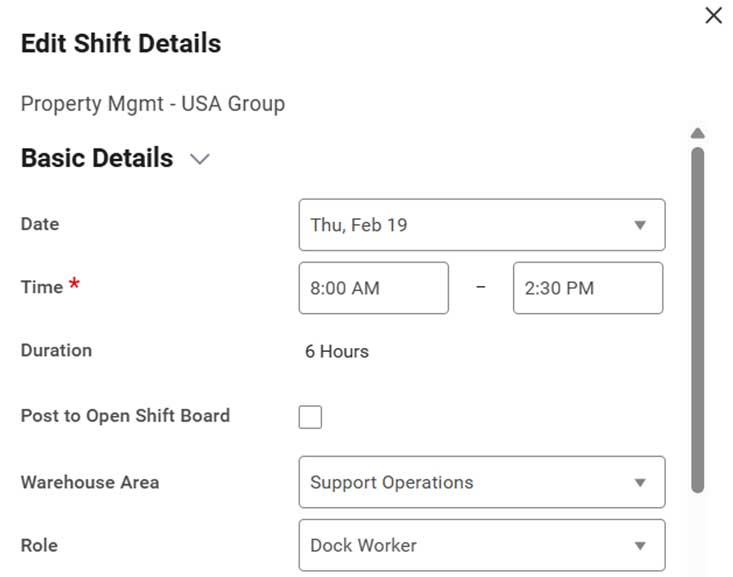
  • The worktag generation occurs when workers check in/out or when they use auto-fill from schedule
  • Schedule tags are the primary component that maps to customย worktagsย in Time Tracking
  • Each schedule tag value can be mapped to a correspondingย worktagย value
sched time worktag 01
sched time worktag 02 469px 1

Schedule Priorities to Workers

A new method of organizing shifts when constructing them for optimal staffing

Availability: Set Up Required

Level of Effort

Why this is important: Schedules can be sorted by priorities, which grants managers more control when building shifts for their teams

Priorities are set to workersโ€™ schedules based on the employee position

  • The new Assign Schedule Priority to Worker task lets users set priorities from 1 (highest) to 9999 (lowest)
  • With priorities set,ย a user can then sort shifts by higher or lower priorities to see them all at a glance and take mass actions on them

This update comes with a new business process: Change Worker Schedule Priority

  • After setting up its securities, you can run the task Assign Schedule Priority to Worker

Use case: preparing for a day of slow traffic

  • If managers anticipate a slower day and wish to preserve only their top performers, they can filter all shifts in a day with priorities > 10 and eliminate them, thereby preserving the top-priority shifts

Talent & Performance

Skills Cloud Skill Descriptions

AI generated skill descriptions

Availability: Set Up Required

Level of Effort

Why this is important: Allows your workforce a better understanding of the skill they are developing or adding to their Talent Profile

tp skills cloud description

Anonymous by Default Feedback

Simplified method of collecting nameless feedback

Availability: Automatically Available
Availability: Set Up Required

Level of Effort

Why this is important: This simplifies the process in gathering anonymous feedback so that feedback providers no longer need to manually select the anonymous setting.

Feedback Requests can now be set to automatically specify feedback requests as anonymous
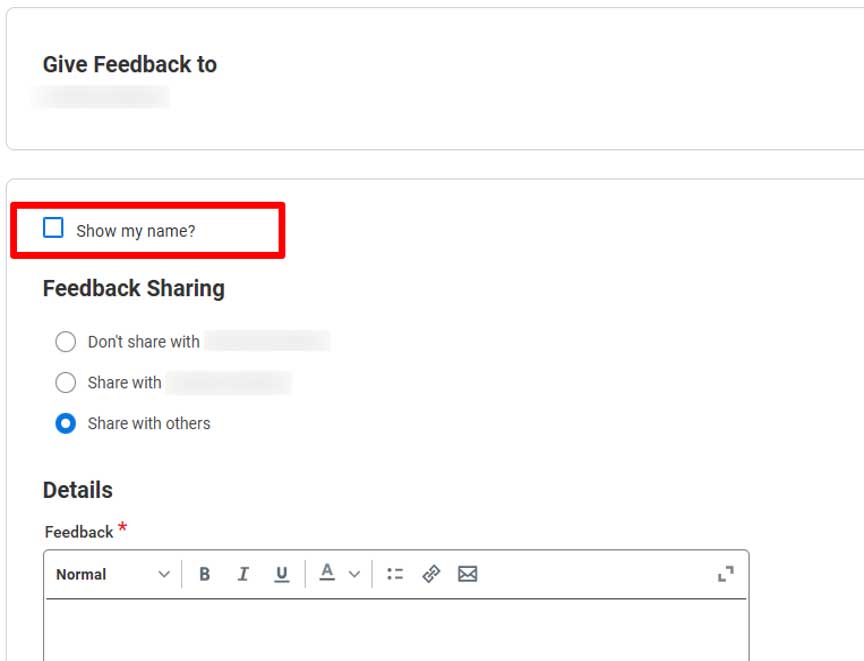
  • Applies to Give Feedback, Get Feedback on Self, and Get Feedback on Worker tasks
  • Feedback Responders can still choose to show their name
tp anon feedback default

Succession Planning: Skills, Insights, Compare Candidates

Expanded candidate insights

Availability: Set Up Required

Level of Effort

Why this is important: Succession Planning is now easier by providing a faster, more wholistic comparison between succession candidates
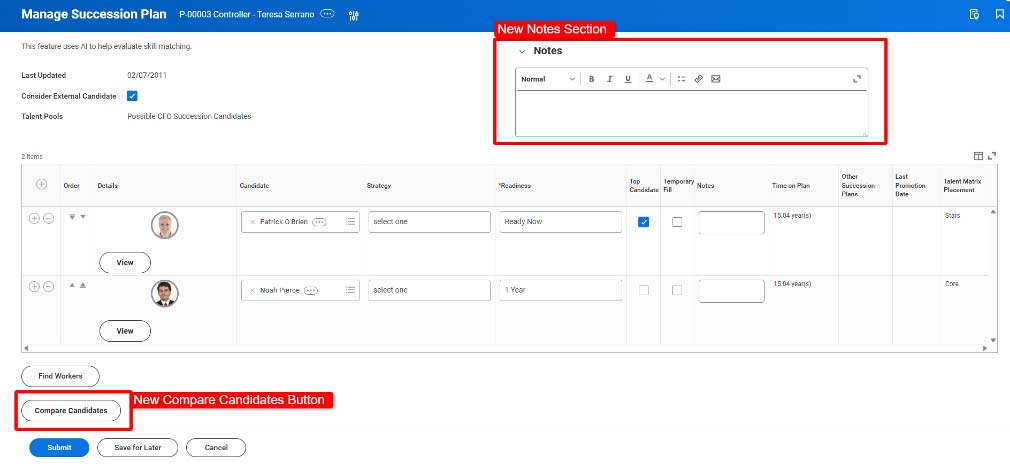
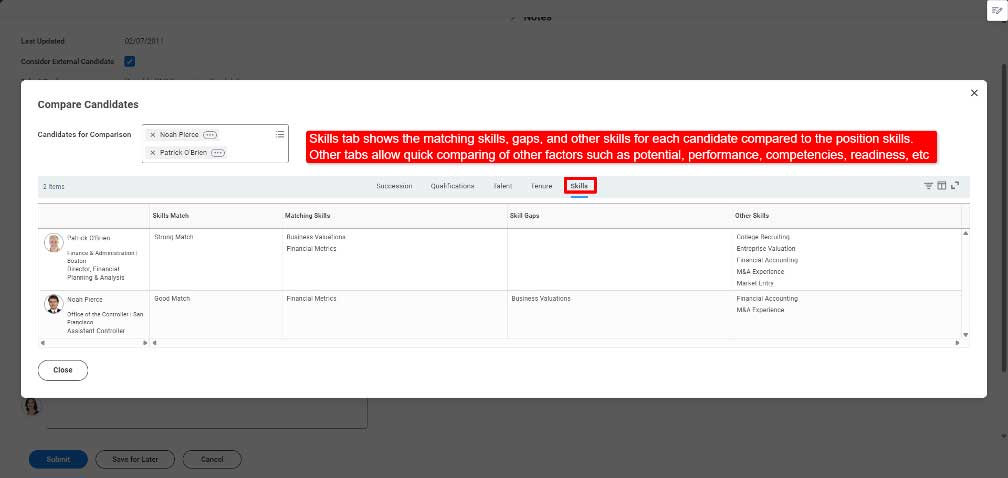
  • Succession planning tasks now include a โ€œCompare Candidatesโ€ function for quick side-by-side visibility into candidate details
  • Succession plans now include a โ€œNotesโ€ section which is reportable
tp succession plan 01
  • If utilizing Skills Cloud, succession plans and compare candidates include a column for skills matching
  • Skill must be populated on both the position and the candidate
tp succession plan 02

Reporting

Create Workbooks from Composite Reports

Improved Data Analysis Capabilities

Availability: Automatically Available

Why this is important: It is a way for those more comfortable to excel to continue with their analysis in a similar format, but in a more secure fashion

Workday now provides the ability to create a Worksheet from a Composite Report to allow for additional data manipulation and analysis
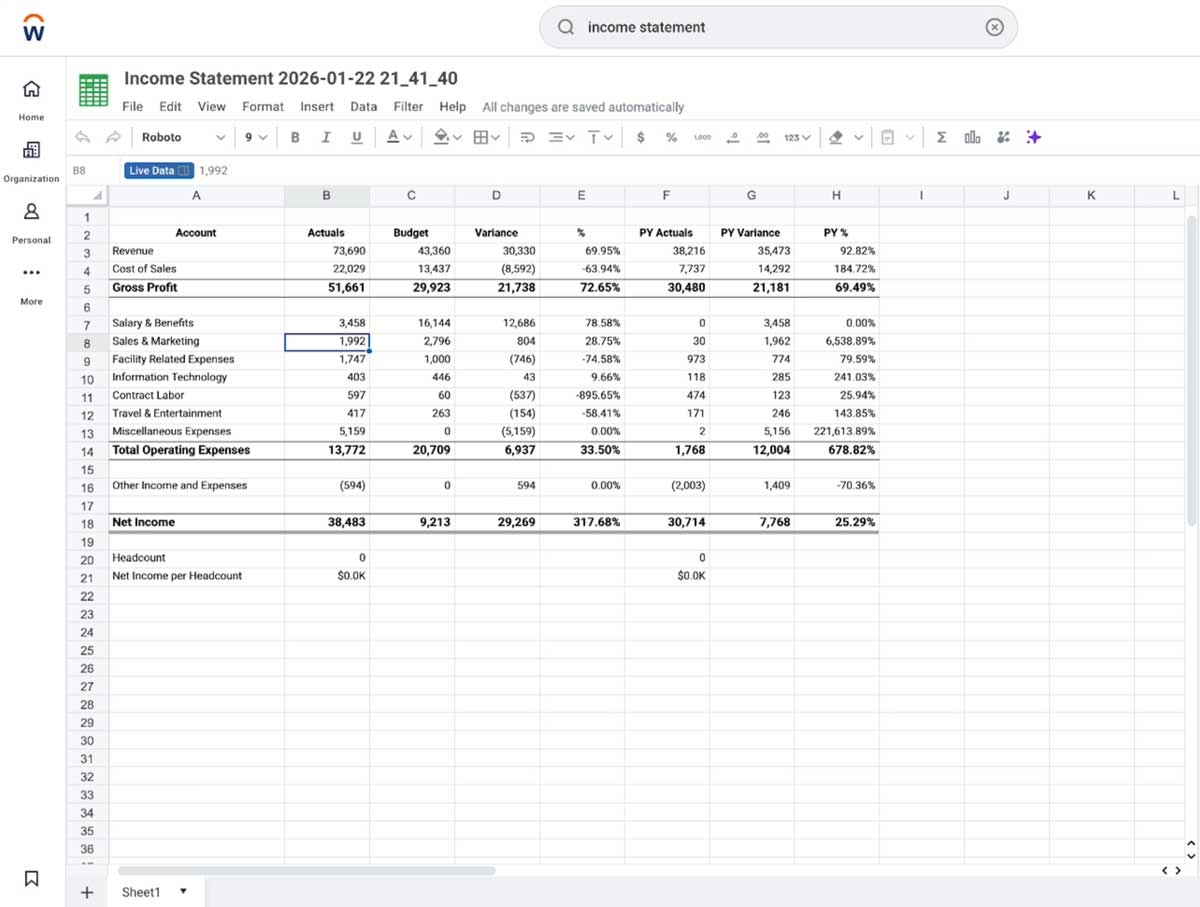
  • Allows for additional options regarding data manipulation and analysis
  • Gives more of an Excel type experience for those that are more comfortable with that too
rep workbooks from reports

Report Prompt Control

Focusing of Prompts

Availability: Set Up Required

Level of Effort

Why this is important: Allows Report Writers to provide a different level of control for what people can prompt and makes selection more efficient

Managers can now track upcoming and overdue onboarding tasks for new hires on the Manager Insights Hub
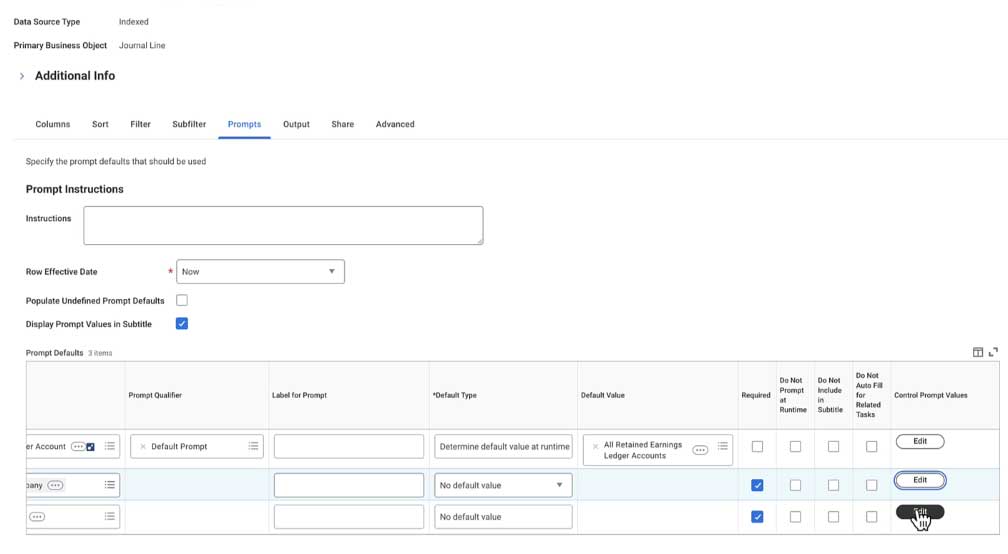
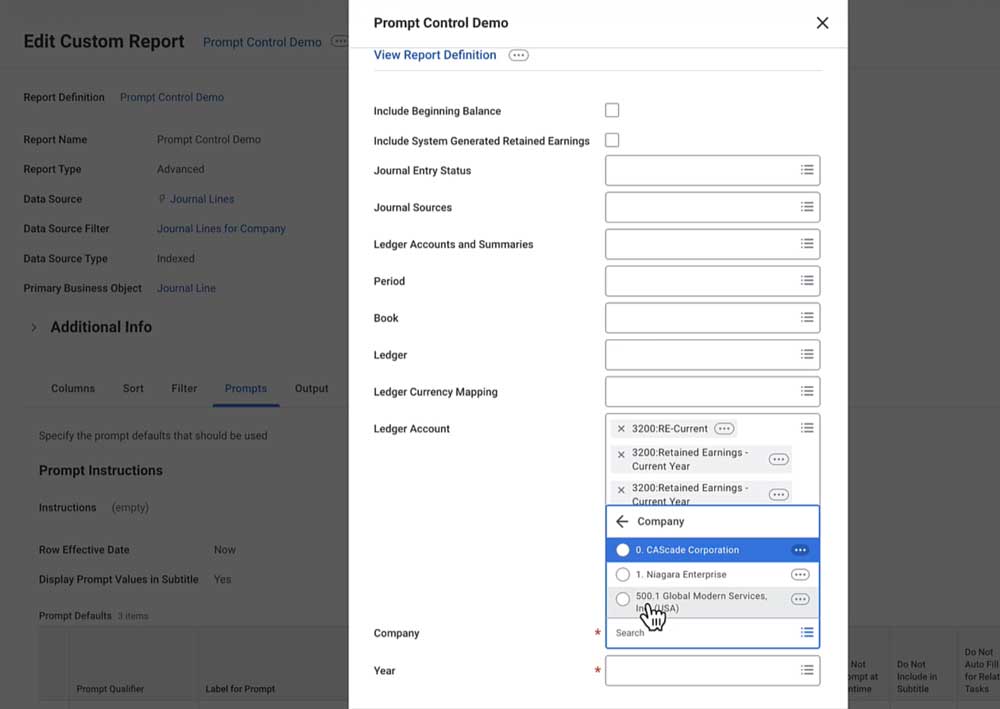
  • Report writers can edit the Prompt Controls and specify what fields they want to show up as an option to the end user when they are running the report
  • Cuts down on the number of instances an end user can see to make running the report more efficient for them
rep prompt control 01
rep prompt control 02

Funnel Chart for Matrix and Trending Reports

Process Visualization Improvement

Availability: Automatically Available

Why this is important: Provides additional visualization options to improve end user experience

Funnel Charts are now possible within Matrix and Trending Reports
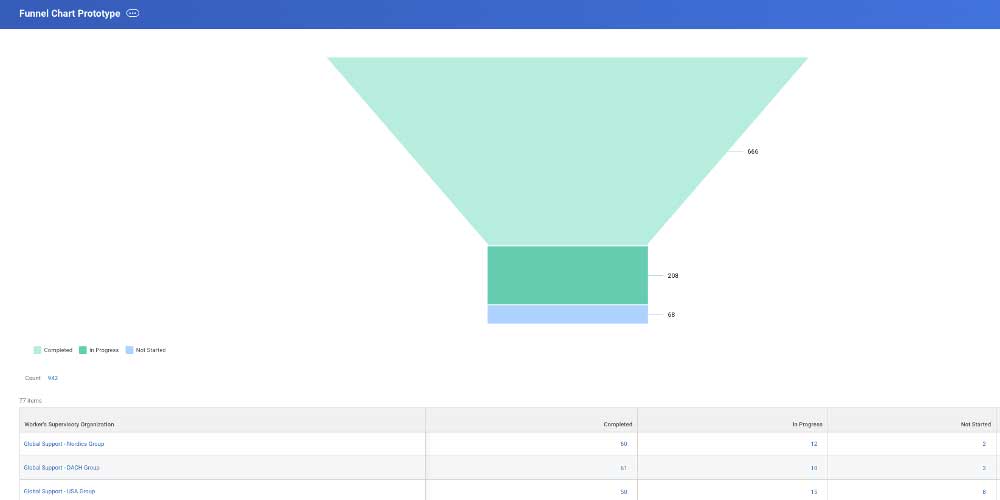
  • Allows for reporting to display linear process reporting with distinct stages as data moves through sequentially
rep funnel chart matrix

Learning

Audience Builder Improvements

Data Source Filter prompts and UI improvement

Availability: Automatically Available

Why this is important: Data Source filter prompts will enable will give access to report fields that have built in prompts

Data Source Filters with built in prompts

  • Prompts are now available at the creation
  • Can be adjusted
  • Fields that use built in prompts can be used within audiences

New prefix for searching for audiences

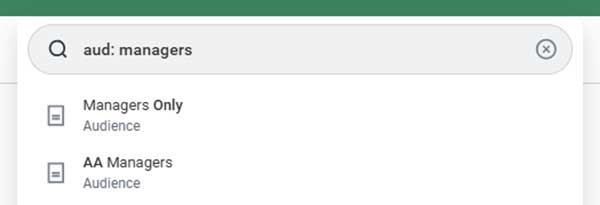
  • Use โ€œaud:โ€ prefix to search for audiences through global search

User Interface Enhancements

  • Information button available when editing audience
  • Access to audit trail and optional parameters
learn audience builder 01
learn audience builder 02

Custom Report Audiences

Delayed Release Item from 2025R2 โ€“ In prod 12/5

Availability: Set Up Required

Level of Effort

Why this is important: Gives you the ability to use the custom reports previously created for your audiences
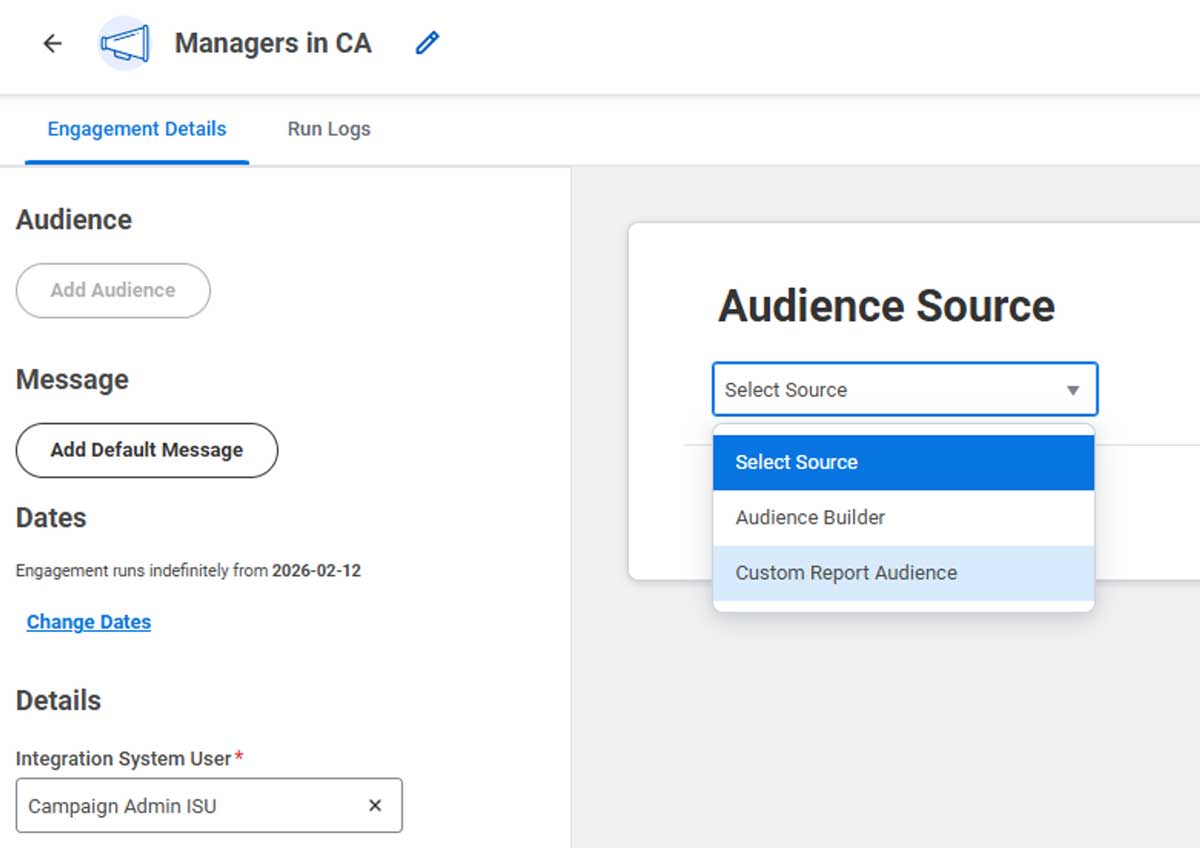
  • Allows you to save time with converting to Engagement Builder by allowing you to use your existing reports as the audience source
  • Preview Audience feature will not be available
  • The report must meet these 4 requirements. Adjusting them will not impact your campaigns running currently
  • Advanced Report types only
  • Enabled as a Web Service
  • Default Prompts must be filled in
  • Shared with ISU
learn custom report

Observational Checklist Consumption

Follow up on Observation Checklist in 2025R2

Availability: Set Up Required

Level of Effort

Why this is important: Observational Checklists can be added to courses and learners can now be assessed using them
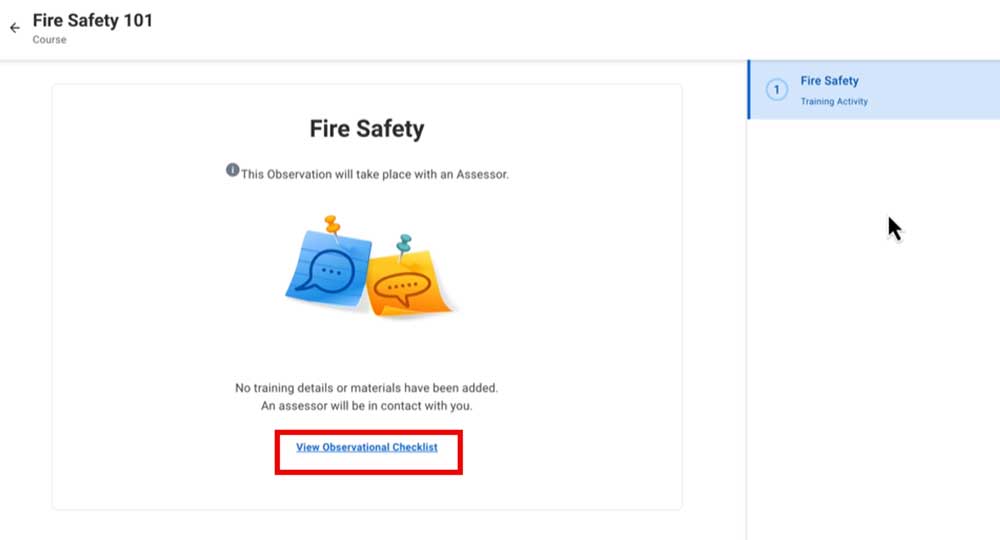
  • Observational Checklists can now be added to Blended Courses
  • Learner can preview the checklist
  • Assessors can use the new task โ€œAssess Observational Checklistโ€ to view incomplete check lists for learners assigned to them
  • Available on mobile
learn observational checklist

People Experience

Article Approval Workflow

Approval workflow for Knowledge Management articles

Availability: Automatically Available

Why this is important: This feature gives you greater visibility into Knowledge Management articles, improves article quality, and maintains a clear edit history for transparency.

  • Article authors can choose to have their article reviewed by others before publishing it
  • The author:
  • Can select multiple approvers and choose to require all or just one approver sign-off
  • Can add a message to the approval request
  • You may specify one approver, or all assigned approvers
  • Author cannot make edits while the article is in Pending Approval status
  • Author can cancel the process at any time
  • Help Article Workspace updated to include new categories:
  • Shared With Me: Displays all articles shared with you
  • Approvals: Tracks articles you sent for review or those awaiting your approval
pex article approval

Article Lifecycle Management

Articles will now have a publication date and expiration date.

Availability: Automatically Available

Why this is important: Ensures that only current information is available to users, while reducing the timely maintenance required to do so.

  • The Articles functionality now includes the ability to manage publication and expiration dates, enabling authors to ensure only current, relevant information is displayed.
  • Publish Now makes the article available immediately.
  • Schedule Publication to make it available in the future.
  • Set an optional expiration date.ย 
  • Workers will not have access to expired information
  • Global rules can be configured for notifications and auto-archiving.
  • Edit Tenant Setup โ€“ Help โ€“ New configuration options in Article Lifecycle section:
  • Show Publication and Expiration Dates on View
  • Dates to Notify Before Expiration
  • Auto-Archive on Expiration Date
pex article lifecycle

Journey Distribution

Distribute a Journey Using Any Business Process

Availability: Set Up Required

Level of Effort

Why this is important: Allows for a Journey experience for a user going through any business process.

  • The Journey Distribution Step is now available for all business processes
  • Formerly, this was only available on: Add Additional Job, Change Job, Contract Contingent Worker, Hire, Termination
  • The functionality is automatically available in your tenants, but youโ€™ll need to configure your specific business process(es) to include the Journey Distribution Service step.
pex journey distribution

Recruiting

Onboarding Plans: Manager Task Visibility

Manager Visibility via Manager Insights Hub

Availability: Set Up Required

Level of Effort

Why this is important: Allows managers to quickly identify/address overdue onboarding tasks.

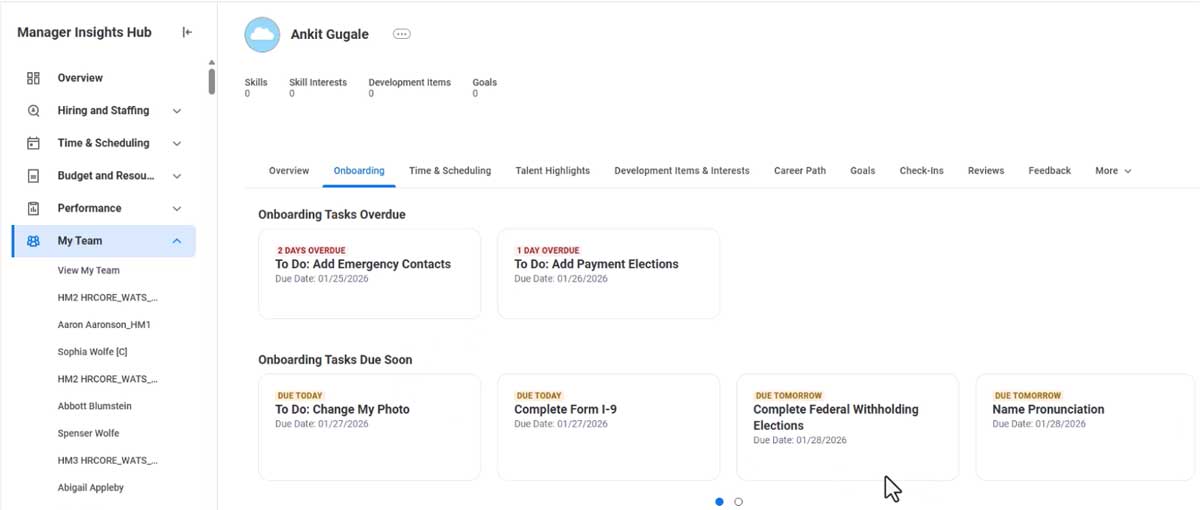
Managers can now track upcoming and overdue onboarding tasks for new hires on the Manager Insights Hub
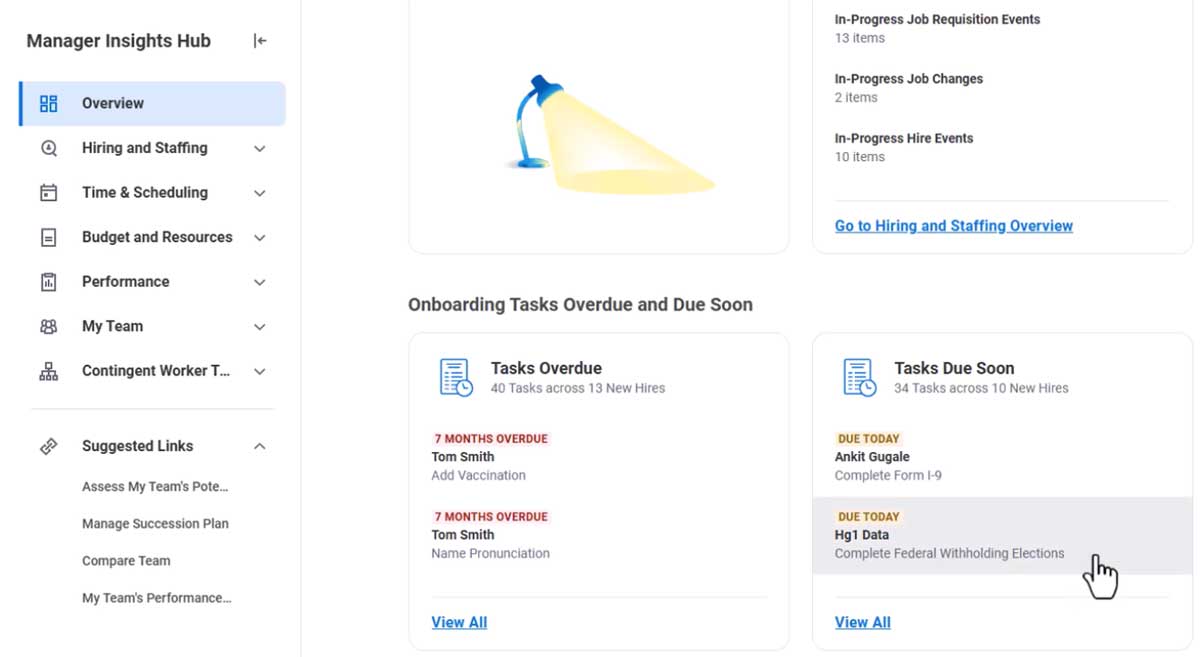
  • Provides direct visibility to managers without the need to navigate to additional hubs/dashboards
  • Adds a new โ€œOnboarding Tasks Overdue and Due Soonโ€ section to the โ€œOverviewโ€ page of the Manager Insights Hub
  • Includes โ€œTasks Overdueโ€ and โ€œTasks Due Soonโ€ cards
rec onboarding plans 01

Additional areas for Managers to view onboarding task statuses

  • โ€œMy Teams Onboarding Tasksโ€ modal opens when you click โ€œView Allโ€ on onboarding tasks cards on the Manager Insights Hub
  • Can filter on all new hires and toggle between โ€œOverdueโ€ and โ€œDue Soonโ€ lists
  • New Worker Profile โ€œOnboardingโ€ tab
  • โ€œRequires Attention: View Onboarding Tabโ€ card will display the single most critical onboarding task for that worker

Due date labels to help identify the urgency of new hire onboarding tasks
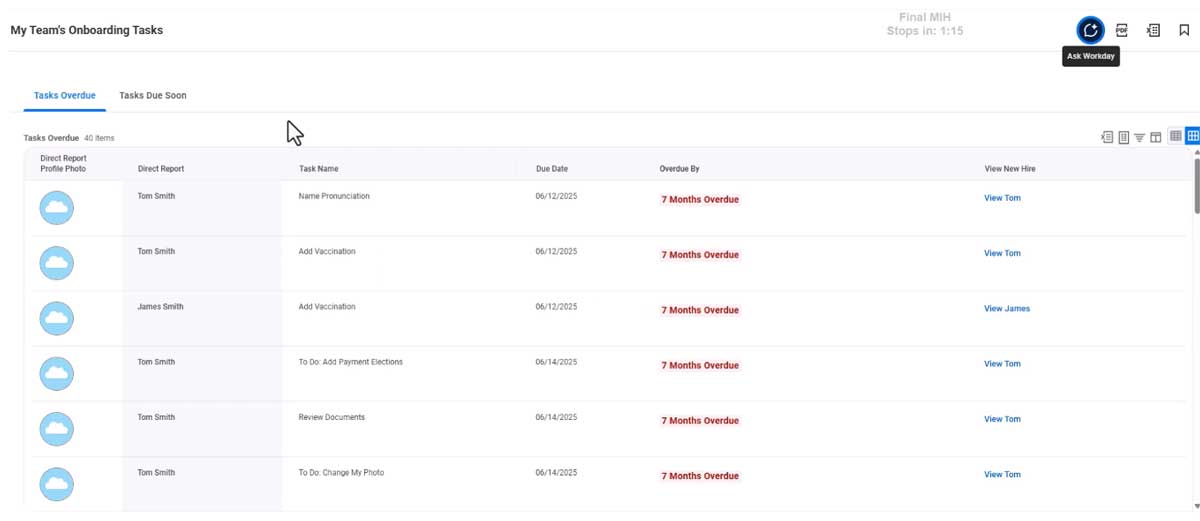
  • Labels for โ€œUpcoming Tasksโ€ and โ€œOverdue Tasksโ€
rec onboarding plans 02
rec onboarding plans 03

Fraudulent Job Application Settings

Ability to Identify Fraudulent/AI Job Applicationsย 

Availability: Set Up Required

Level of Effort

Why this is important: Improves reporting capabilities on the nature of applications.

Enables you to get more insights into network and location information for job applications coming through the external career site

  • Two new check boxes are delivered within โ€œEdit Tenant Setup โ€“ Recruitingโ€
  • Collect Candidate Signal Data Level 1
  • Disable Candidate Personal Information Editing on Candidate Home
  • Removes the โ€œUpdate Personal Informationโ€ option within the settings menu on the Candidate Home account

New report fields available once checking the โ€œCollect Candidate Signal Data Level 1โ€ box

  • Automation Score
  • Autonomous System Number
  • Count off Job Requisition Applied To
  • External Job Application Duration
  • Geolocation Country Code
  • IP Address
  • JA4 Fingerprint
  • Page
rec fraud job app

Recruiter Hub

Updated User Interface and Consolidatedย Tasks within Recruiter Hub

Availability: Automatically Available
Availability: Set Up Required

Level of Effort

Why this is important: Enhances recruiter experience by consolidating tasks and visibility to key recruiting information without additional navigation away from the Recruiter Hub.
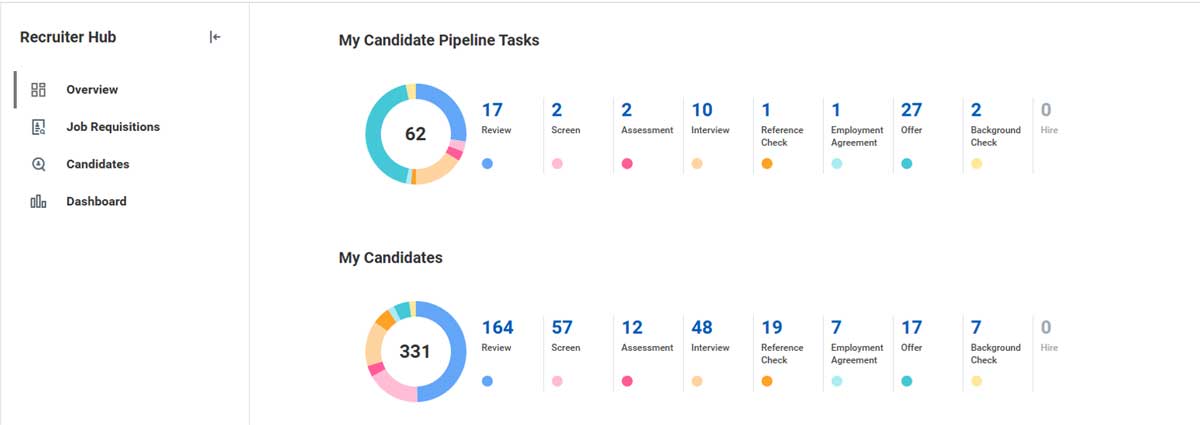
  • Updated domain security for task cards
  • Inbox item task cards for Assessment, Employment Agreement, Ready for Hire, and Reference Check were previously secured to the Core Navigation domain and are now secured to the Recruiting Hub Domain.
  • This streamlines security access to all delivered cards on the hub
  • โ€œMy Inbox Tasksโ€ pipeline card is now listed as โ€œMy Candidate Pipeline Tasksโ€
  • Instead of navigating away from the hub, recruiters can now view all tasks on a card through a pop-up window by clicking โ€œMoreโ€
rec hub 01

Time Tracking

Segmented Security for Time Entry Codes

Control Edit/Entry of time through segmented security

Availability: Set Up Required

Level of Effort

Why this is important: Improves compliance with company policies and labor laws. Helps support Payroll Processing by preventing incorrect time entry.

Features & Notes
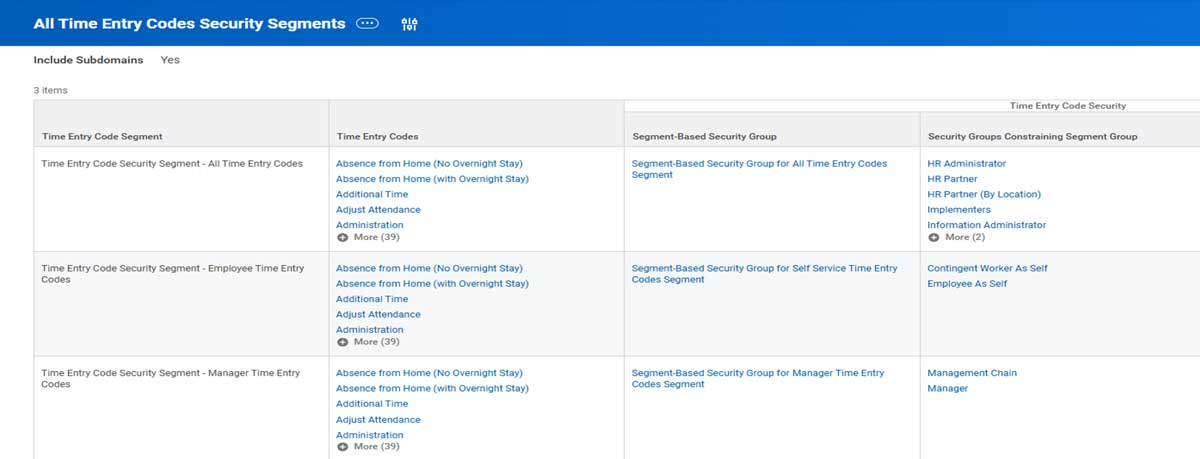
  • Comparable to Time Off and Leave Type Segmented Security
  • When enabled, Workday displays Time Entry Codes when:
  • The userโ€™s security role has access to the Time Entry Code
  • The user is eligible for the Time Entry Code
  • Managers and Administrators will see the Time Entry Codes they are eligible for. Not the Time Entry Codes based on the workerโ€™s eligibility.
tt segmented security 1200px 1

Time Calculation Support for Multiple Positions

Control eligibility for time calculation based on Position

Availability: Set Up Required

Level of Effort

Why this is important: Time Calculations are applied to time blocks when workers enter time to multiple positions. Provides more information on time blocks of single-position workers.

Workday now supports time calculations at the position level. This update applies to all calculation types besides those listed below:

  • Accumulated Overtime
  • Flextime
  • Holiday Time Block Create
  • Minimum Rest

Time Calculation Groups can be Position-Based or Worker-Based

  • Once a Time Calculation Group is worker-based or position-based, the base cannot be changed.
  • When position-based, you can use position criteria in eligibility rules.
  • Time calculations can reside in both types, so workers can be eligible for both.
  • In a worker-based group, calculations trigger on all time blocks.
  • In a position-based group, calculations run on time blocks for selected positions only.

Time Entry Validation for Multiple Positions

Control eligibility for time calculations through position or CBA

Availability: Set Up Required

Level of Effort

Why this is important: Time Calculations are applied to time blocks when workers enter time to multiple positions. Provides more information on time blocks of single-position workers.

You can associate Collective Agreements with Time Calculation Groups through a new prompt on these tasks:

  • Create Time Calculation Group
  • Delete Time Calculation Group
  • Edit Time Calculation Group
  • View Time Calculation Group

Time Entry Template updates:

  • Time Shift section now includes a Position Based Shifts check box to group time blocks into shifts by position.
  • Totals section has a new Total per Position check box to display the total time per position.
  • These totals are based on the time calculation tags included in the Additional Totals grid.

Integrations

ISO 20022 Integration Template Update

Integration Template Update

Availability: Automatically Available

Why this is important: Improves error troubleshooting and minimizes payment processing delays.
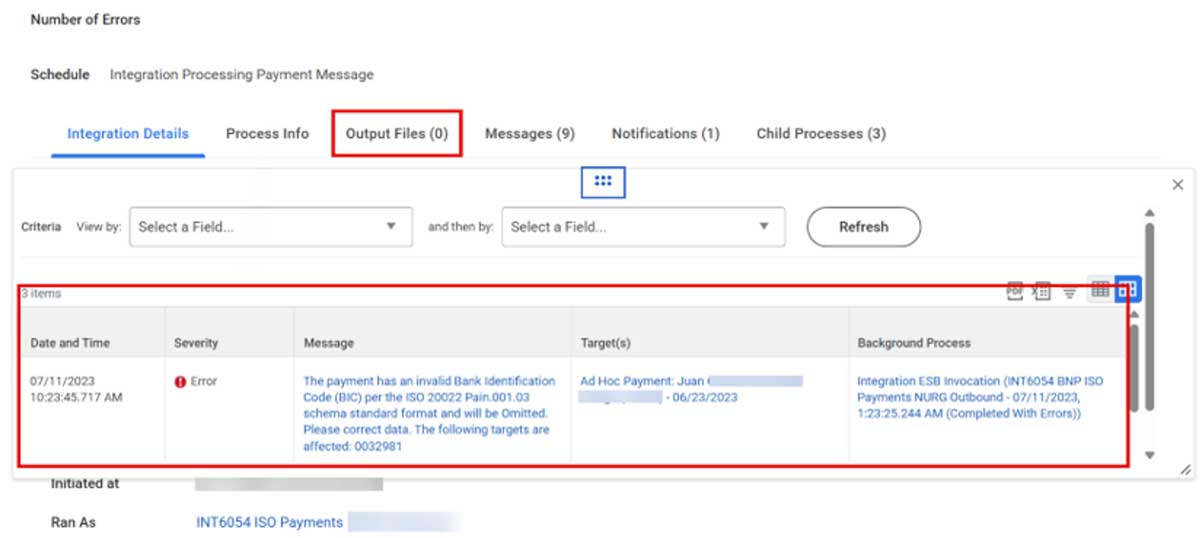
  • Previous versions would fail outbound payment processing, after encountering data issues. Now the integration will โ€˜Complete with Errorsโ€™ which aid with troubleshooting.
  • Applies to the following templates:
  • WPN โ€“ ISO 20022 V2
  • WPN โ€“ ISO 20022 V3 (Enhanced Performance)
int iso 20022 template

Accounting Journal Inbound Connector

Updated service logic to prevent integration from launching

Availability: Automatically Available

Why this is important: Improvements to efficiency and resiliency of your integration.
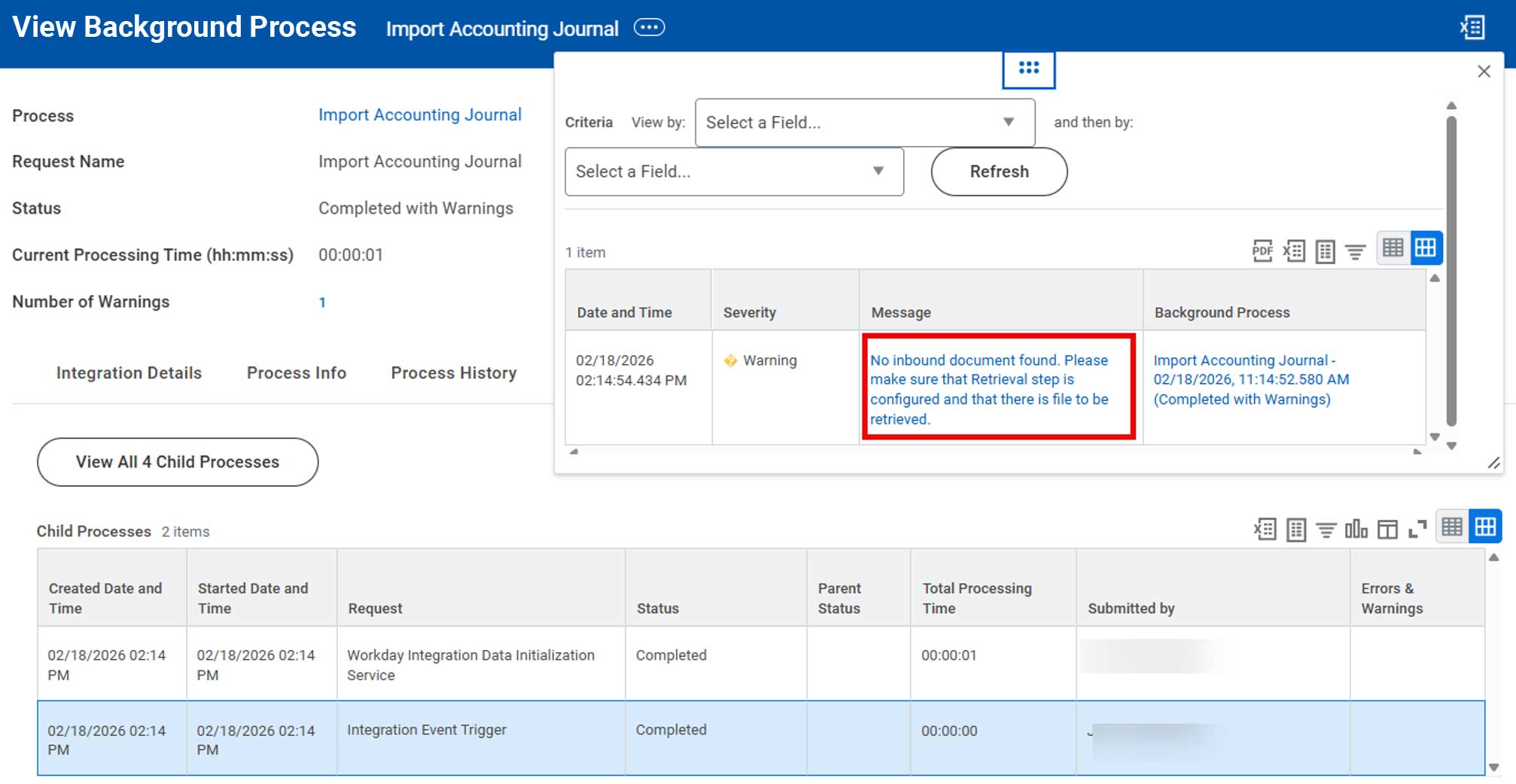
  • Intended to improve efficiency by preventing unnecessary โ€œChild Processes (ESB) from appearing in your View Background Process report when there is no work to be done.
int acct journal inbound 1200px 1

Get Payroll Results SOAP API

Updated Web Service Operation

Availability: Automatically Available

Why this is important: Makes it easier to trace a specific payroll result end-to-end when validating payroll, invoices, or downstream GL/tax feeds.

Updated the Get Payroll Results web service to include the WID in the response

  • Simplifies the process of joining the web service output to other reporting sources
  • Allows you to reconcile external invoice and vendor data directly with Workday payroll results
int payroll soap api

You have Workday questions.

We have Workday answers.

How can we begin elevating your Workday experience?

3001 Maple Ave Ste 150
Dallas, TX 75201

Stay in touch -
Sign up for our newsletter!